Lead routing · Speed to lead

Speed to lead, measured in seconds.

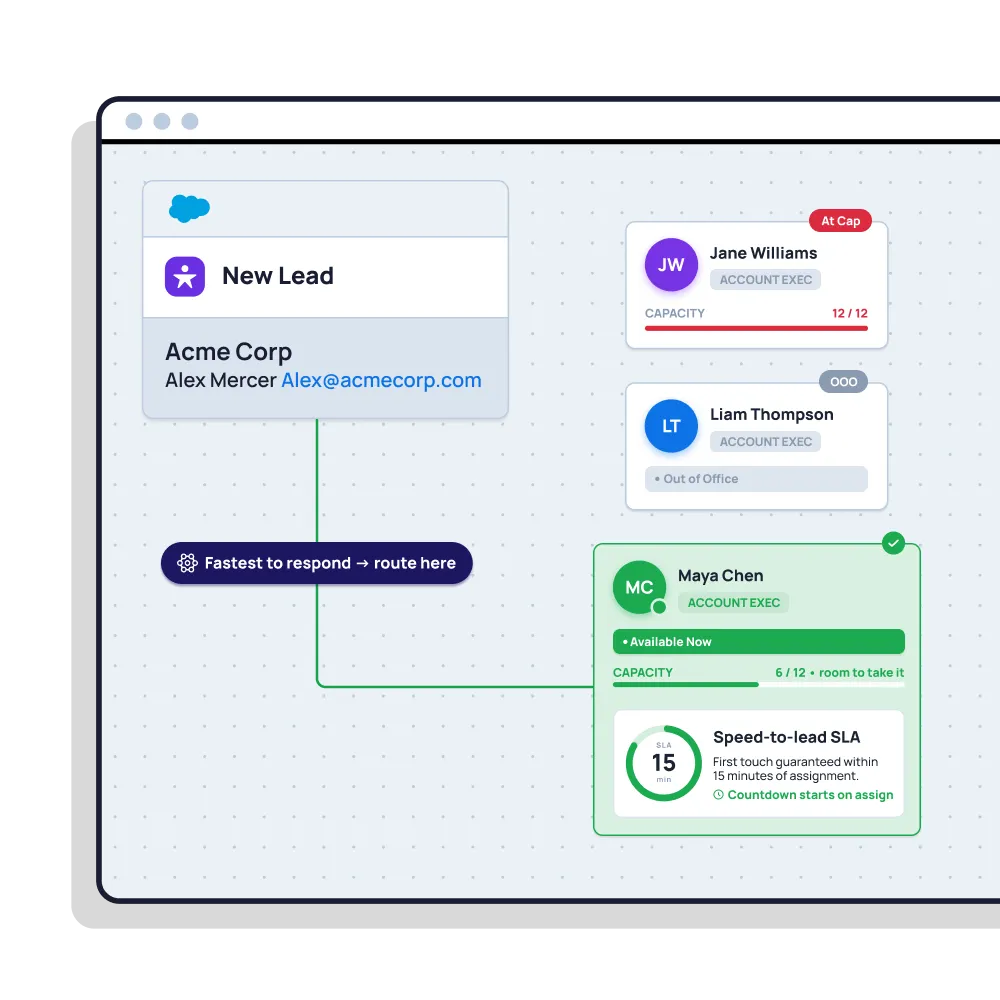
The moment a lead lands, Distribution Engine assigns it, skips anyone away or at capacity, and alerts the owner where they’re already working. No queue, no morning triage, no waiting for someone to notice.

4.9  AppExchange Rating

100% Salesforce-native

Live in minutes

A screenshot of Distribution Engine, the lead routing tool from NC Squared

Trusted for fair, fast routing by 20,000+ users since 2013.

The problem

Most leads aren’t lost. They’re just answered too late.

The delay is in the handoff

The lead arrives in seconds. Then it waits — for a queue to be checked, a rule to run overnight, or someone to notice it and pass it on.

Assigned isn’t the same as seen

A lead can be assigned instantly and still sit unread for hours, because nothing told the rep it was there.

Fast to the wrong rep is still slow

Routing instantly to someone on holiday, or already buried, just moves the delay somewhere less visible.

In short

What is speed to lead?

Speed to lead is how long it takes to make first contact with an inbound lead after it arrives. It’s widely studied because response time and conversion are closely linked: leads contacted within minutes are far more likely to be qualified than those contacted hours later, and the odds fall away sharply as time passes.

Speed to lead vs lead response time: the two are often used interchangeably. In practice, lead response time is the measurement — the minutes elapsed before first contact — while speed to lead is the discipline of keeping that number as low as possible. Distribution Engine attacks the part teams control: the delay between a lead arriving and the right rep knowing about it.

Read story
Beyond the basics

Close the gap between “arrived” and “being worked”.

Every second between a form submission and a rep picking up the phone is a second you can take back.

Instant assignment on arrival

Leads route the moment they’re created — not on a schedule, not in a nightly batch, not when someone checks the queue.

Alert the rep where they work

Push the new lead to Slack, email or mobile the second it’s assigned — so it’s seen, not just sitting in a list view.

Only to reps who can act

Skip anyone out of office, off-shift or at capacity, so “instant” means instantly worked — not instantly ignored.

Re-route if nobody bites

If a lead isn’t actioned inside your SLA, pull it back automatically and pass it to the next available rep.

Measure the real number

Report on actual response times by rep, team and source — so speed to lead is a metric you manage, not a slogan.

100% Salesforce-native

Routing runs inside your org the instant a record is created — no middleware hop, no sync lag, no data leaving Salesforce.

Distribution Engine vs. native Salesforce

Where the minutes actually go.

Native assignment rules can fire on create — but they can’t alert the rep, skip someone who’s away, or take a lead back when it isn’t worked.

Capability
Native Salesforce
Distribution Engine
Even round robin rotation
Weighted distribution
Capacity caps & live workload balancing
Availability, shifts & out-of-office
Skills, territory & account matching
Limited
Auto-reassign on SLA breach
Round robin any object (not just Leads)
No-code edits by the team that owns the work
Audit trail & reporting in Salesforce
Basic
Capability
Native Salesforce
Distribution Engine
Assign the instant a lead is created
Basic rules
Instant Slack / mobile alert to the owner
Skip reps who are away or at capacity
Auto re-route if not actioned in time
Handle after-hours leads with a rule
Report on real response times by rep
Basic
No middleware hop or sync lag
Yes
No-code setup by the ops team
The Payoff

Faster first contact, better numbers.

<
10
min
average response time
40
%
higher lead conversion
97
%
routing accuracy
across customers
8
hrs
saved every day

"Distribution Engine has totally transformed how we handle lead distribution. It’s fast, reliable, and keeps us ahead of the game."

Read story
Justin Norris
Director of Marketing & BDR Operations
Get started

Answer inbound before your competitors do.
See how fast your leads could reach a rep. You can trial Distribution Engine for free, or get in touch if you’d prefer to chat.

Your questions answered.

Speed to lead FAQs.

What is speed to lead?

Speed to lead vs lead response time — what’s the difference?

What’s the best speed-to-lead software for Salesforce?

How do I improve speed to lead in Salesforce?

How does speed to lead impact revenue?

What’s a good speed-to-lead target?

Why are our leads still slow if routing is instant?

Does it work for after-hours leads?

How is round robin in Distribution Engine different from native Salesforce assignment rules?

Can I weight round robin so some reps get more leads?

How do I keep round robin fair when reps are on holiday or out of office?

How do I route leads by territory and still keep round robin?

Can I round robin cases and other objects, not just leads?

What happens if a rep doesn't action their lead in time?

Is it really no-code?

How does Distribution Engine compare to other round robin tools?

Is Distribution Engine Salesforce-native?

Does workload routing work alongside round robin?