
Salesforce Ben's AppAssessor review of Distribution Engine - check it out now!
Test it for free for 30 days or get in touch if you’d prefer to chat.
Fancy giving Distribution Engine a try?
Have a play around for free, or get in touch if you’d prefer to chat.
Route Leads by Availability: Mastering Team Hours in Salesforce.
Key takeaways:
Business Hours define when your company is open, Team Hours determine who's actually working: Routing to "technically available" reps who are offline, across shifts, or in different time zones wastes your speed-to-lead investments.
Fixing availability boosts your KPIs: Response time drops from hours to minutes, distribution equity prevents overload, and forecasting becomes predictable when assignments align with actual coverage windows.
Salesforce’s Business Hours lack granular shift management: Managing 60+ schedule variations across shifts, regions, and PTO creates administrative burden that scales poorly and introduces lag when schedules change.
Dynamic availability as a routing input eliminates coverage gaps: Combining Distribution Hours, online/offline controls, PTO entries, and capacity logic routes leads only to reps working right now with bandwidth—no manual cutover, no dropped assignments.
Real implementations reclaim strategic time from administrative firefighting: 360Learning achieved sub-10-minute response with 40% conversion lift, Tebra improved 40% faster with 30% higher conversions, Shutterstock saved 60 hours weekly, Aetna recovered eight hours daily per manager.
RevOps teams obsess over lead scoring, territory design, and assignment rules. Many skip a more fundamental question: is the rep you're routing to actually working right now?
Managing Team Hours close that gap - not as a peripheral setting, but as a strategic lever that determines whether your speed-to-lead investments actually deliver results.
The availability problem modern teams face.
RevOps teams spend months tuning assignment rules, lead scores, and territory models. But one simple question often slips through the cracks:
Is the rep you’re routing work to actually online?
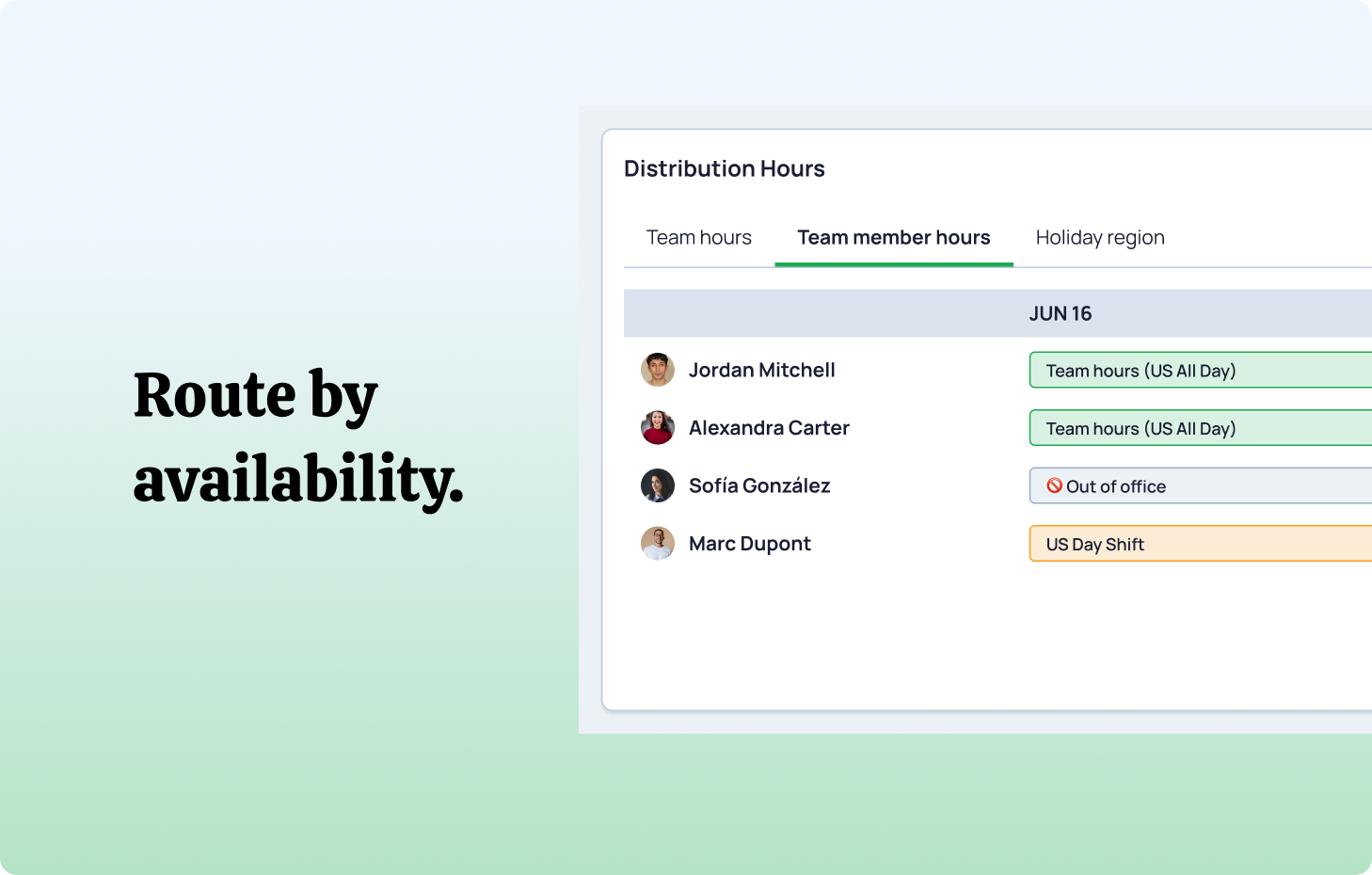
For many teams, the answer is “not always.” Salesforce Business Hours only show when the business is open, not whether individual reps across regions and shifts are available. When your CRM treats everyone as available, routing inevitably lands on unavailable reps — slowing speed-to-lead and creating those awkward “why didn’t anyone follow up?” moments.
You see this when:
- SDR shifts overlap (7–3 vs. 12–8).
- EMEA handles work while North America sleeps.
- Part-time or flexible schedules don’t fit a clean 9–5.
- Enterprise AEs block out focus time and aren’t always “on.”
Your actual coverage becomes fragmented, but routing still behaves as if the whole org is working the same hours.
How Team Hours fit into this
Team Hours represent the specific, working hours of individuals or groups within your broader organizational schedule.
Think of it this way: Business Hours are the storefront sign that says "Open 9–5." Team Hours are the actual staff schedules that determine who's behind the counter at any given moment.
In Distribution Engine, our own routing software’s architecture, this is handled by Distribution Hours: configurable working windows at team, individual, or shift level, combined with online/offline status (for when people are out of office or off sick), and optional Salesforce Calendar sync.
Two layers that matter:
- Global Business Hours: Company-wide operating window
- Team and Distribution Hours: Shift-specific, role-specific, or individual availability within that window
This granularity creates three immediate benefits.
Three ways fixing availability shows up in your performance metrics.
Implementing Team Hours delivers outcomes beyond operational efficiency.
Speed-to-Lead Optimization
When routing respects real-time availability, average response time drops significantly. You're not just faster than competitors - you're catching leads during their highest engagement window.
As an example 360 Learning used Distribution Engine to automate lead assignment across regions and shifts, achieving sub-10-minute response times and a 40% uplift in conversion for priority leads, with 97%+ assignment accuracy.
Speed to lead matters in a pretty simple, fundamental way; Fresh prospects convert at dramatically higher rates than those who wait hours.
Coverage consistency across regions and shifts
Global teams stop playing time zone roulette. EMEA leads route to active EMEA reps during European business hours, not to Americas teams who won't see them until the following day. Handoffs become intentional, not accidental.
Shutterstock was wasting 60+ hours weekly on routing global inquiries manually before they switched to Distribution Engine. Since then they consolidated 18 queues to one and shaved 6.5 hours off their average response time.
This matters particularly for enterprise sales, where complex deals require sustained context and relationship continuity with the same account manager.
Forecasting that doesn’t rely on guesswork
When assignments align with actual working hours, pipeline velocity becomes predictable. You can model capacity accurately because you know precisely when coverage exists and where gaps occur.
Distribution Engine's logs and performance tiles help RevOps leaders track time-to-first-action, SLA adherence, and active load per rep across different coverage windows.
This transforms territory planning from guesswork into data-driven resource allocation.
Salesforce: what you get out-of-the-box.
Salesforce provides Business Hours as a standard object. You can create multiple records and wire them into case escalations, entitlement processes, and other workflows.
What this enables:
- Basic time zone support
- Holiday calendars
- Queue-level availability windows
This works until it doesn’t. The moment you introduce multiple regions, shifts, and dynamic staffing, the operational overhead becomes impractical.
Granular shift management requires workarounds: custom fields tracking individual schedules, complex validation rules, manual calendar maintenance, or Flow-based logic that becomes brittle pretty quickly.
Also, the administrative burden scales poorly. With 10 reps across 3 shifts and 2 regions, you're managing 60 potential schedule variations before accounting for time off, holidays, or temporary adjustments.
Manual systems also introduce lag. Schedule changes don't propagate instantly to routing logic. Reps update their calendars; leads still flow to offline team members until someone notices and reconfigures the rules.
That's the point where many NC Squared customers move routing into Distribution Engine and let Salesforce Business Hours handle more static processes.
The automation solution: Dynamic Team Hours Management
Purpose-built routing automation radically simplifies this challenge for RevOps and Salesforce Admins. Here’s one we made earlier…
NC Squared's Distribution Engine is a fully native Salesforce app available on the AppExchange that treats availability as a dynamic input rather than a static configuration. Our system combines:
- Distribution Hours at team, individual, or shift level
- Online/offline controls in a lightweight rep widget
- PTO and out-of-office entries, plus optional Salesforce Calendar sync
- Capacity logic including caps, active caps, and load balancing
All of it lives natively inside Salesforce with no external data hops and no extra logins.
How this works in practice.
Instead of defining "Sarah is available Monday–Friday 9–5," you define:
- Teams and shifts (Support Team Alpha: 7 AM–3 PM Pacific, Support Team Bravo: 12 PM–8 PM Pacific)
- Distribution Hours for those teams
- Which reps sit in which teams
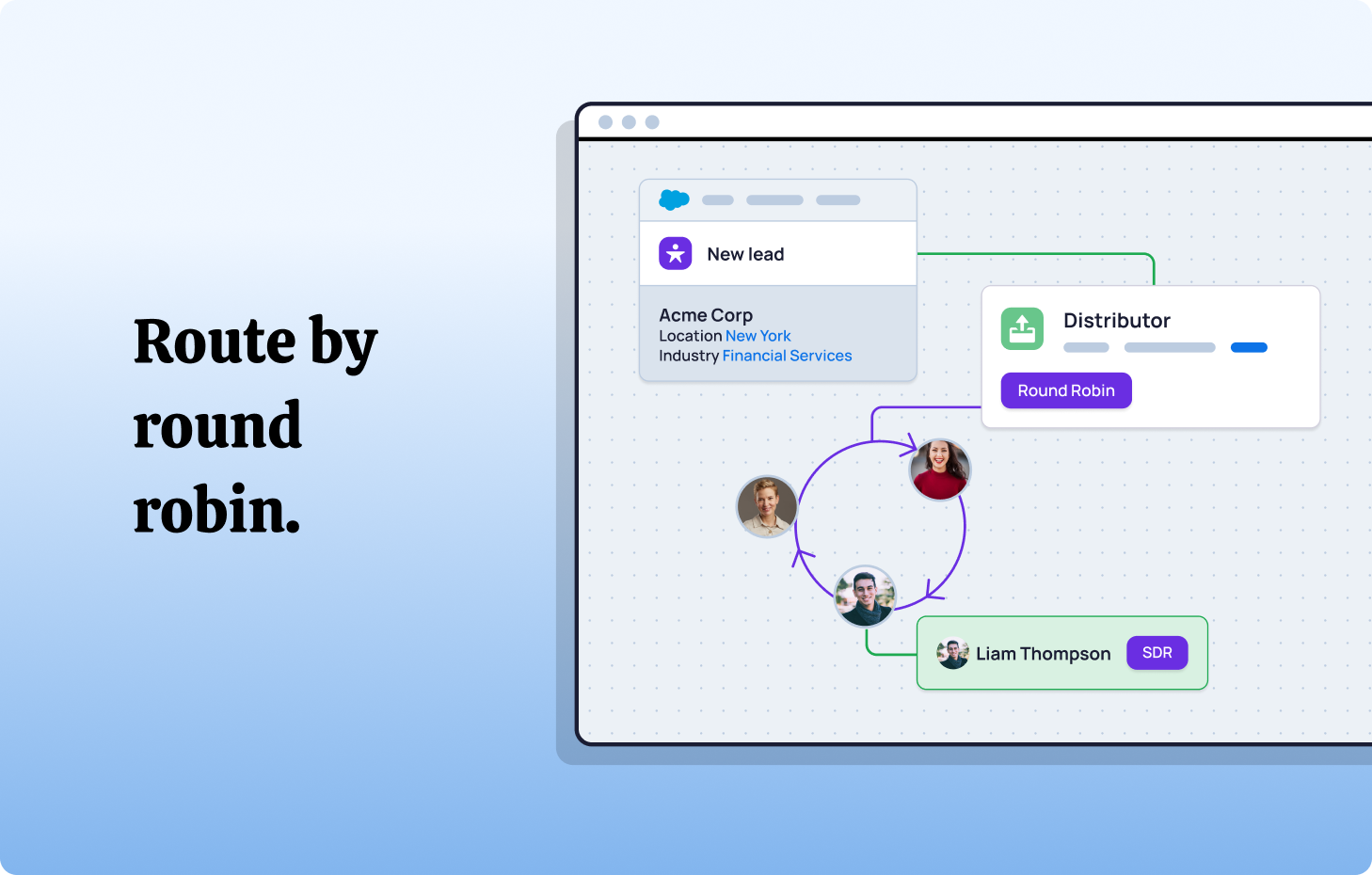
- Rules that route inbound leads, cases (or any object you want) to the active team, then to the right rep using round-robin or load balancing
At 2:45 PM, leads flow to Support Team Alpha. At 3:01 PM, new leads flow to Support Team Bravo.
No manual cutover. No rule rewrites. No leads falling into gaps between shifts.
For global teams, the same pattern extends across regions: EMEA coverage hands off to Americas, Americas to APAC, in a continuous 24-hour cycle.
Distribution Engine's coverage and workforce management features - availability views, PTO entries, quick "sick-day" toggles - support this model without constant admin work.
The capacity layer.
Availability alone isn't sufficient. You also need to answer "who's working and has the capacity to take on new stuff?"
Distribution Engine combines Team Hours with:
- Load balancing so busy reps can catch up
- Per-rep caps (maximum one hot lead at a time)
- Tag-based distribution (sending more volume to experienced reps with years of experience or specific skills)
This prevents overload scenarios where active reps receive assignments faster than they can respond, while still directing high-value work to the right specialists.
Implementing team hours: a practical framework.
Effective Team Hours management follows a deliberate sequence.
1. Audit current state.
Map actual working schedules, not theoretical ones. Where are teams located? What shifts do they work? Where do leads arrive outside coverage?
Identify "silent gaps" - periods with no on-shift coverage but steady inbound volume.
2. Define segmentation logic.
Decide how to slice availability: by geography (Americas vs EMEA vs APAC), by shift (morning, swing, overnight), by job title (SDR, AE, CSM), or by specialization (product line, segment, license type).
Keep it simple initially. Three clear regional pods typically beat five overlapping sub-teams.
3. Establish assignment priorities.
When multiple teams are available simultaneously, what determines routing? Round-robin within the active group? Workload balancing? Skill-based matching?
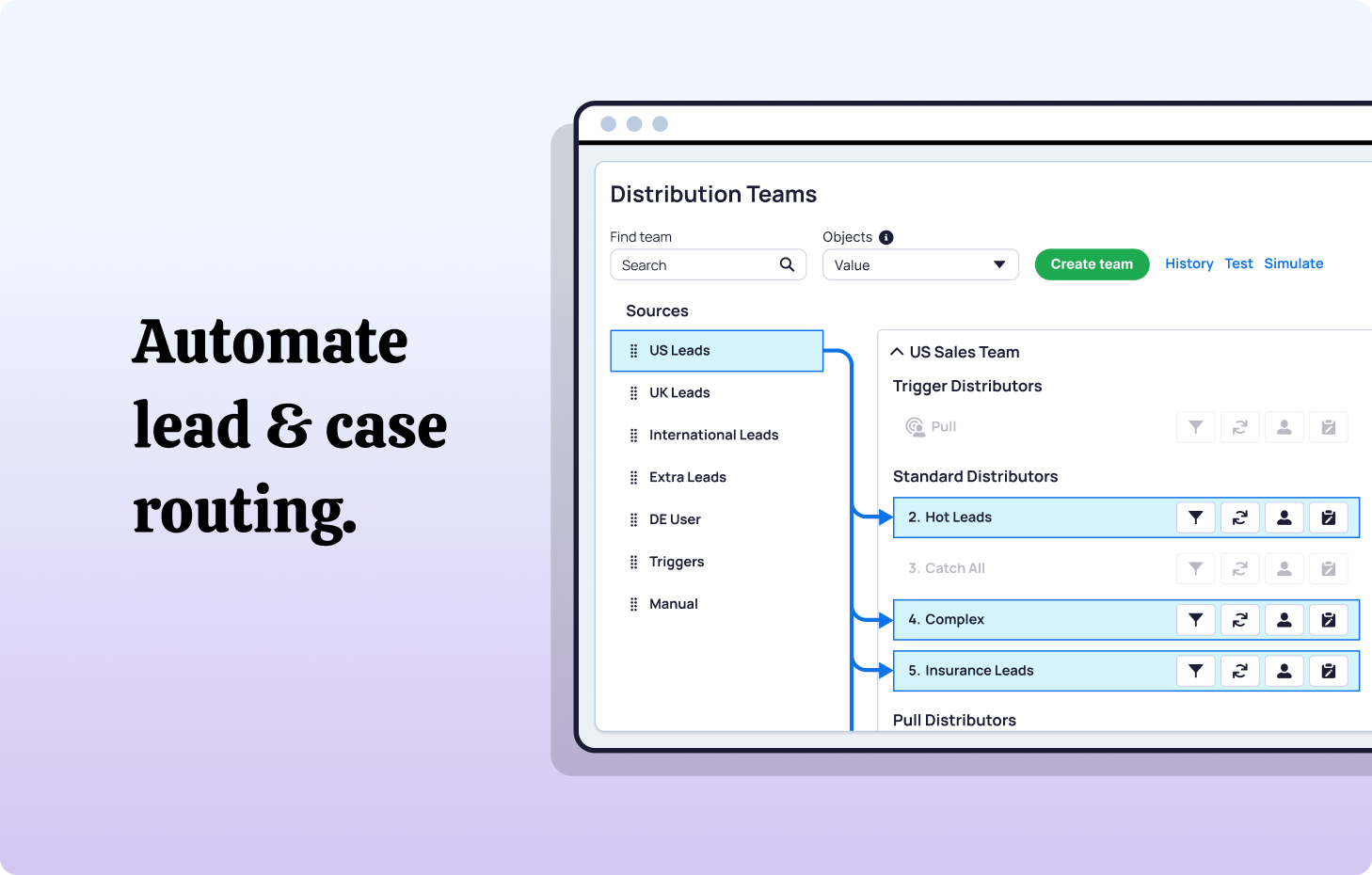
Distribution Engine's distributors combine a method (round-robin, load balancing, sticky assignment, related owner) with filters and tags, so you can encode these priorities without code.
Clear priority logic prevents edge cases from requiring manual intervention.
4. Build automation in Salesforce.
Configure your routing engine so Team Hours are a first-order input, not an afterthought. In Distribution Engine, this typically means:
- Setting Distribution Hours for teams and shifts
- Enabling the rep widget so sellers can toggle online/offline and see SLA countdowns with real-time notifications
- Linking queues or sources to distributors that respect availability and caps
Because Distribution Engine is fully native to SFDC, everything stays in Salesforce and every assignment is reportable as a record. Test thoroughly in sandbox before deploying to production.
5. Monitor and optimize.
Track metrics that reveal system health:
- Time-to-first-touch by hour of day
- Distribution evenness across shifts
- SLA compliance by coverage window
- Reassignment rates when SLAs are missed
Tebra used Distribution Engine's availability controls to improve response times by 40% and boost conversions by 30%, while cutting lead assignment errors by 95%.
Aetna freed more than eight hours per day that managers previously spent manually assigning cases, shifting that time into higher-value work.
Adjust as patterns emerge. Systems require tuning, not just deployment.
The Bottom Line.
Speed to lead only matters if leads reach active reps. Territory design only works if assignments respect actual working hours. SLA tracking only provides meaningful signals if it accounts for real coverage.
Team Hours transform these from aspirational metrics into operational reality.
The gap between "technically available" and "actually working" costs revenue every day. It shows up as slow response times, uneven distribution, and frustrated team members receiving assignments during off-hours.
Closing this gap doesn't require heroic effort or massive process overhaul. It requires treating availability as a first-class routing input - automated, dynamic, and continuously validated.
NC Squared's Distribution Engine and Booking Engine are built exactly for this point: when out-of-the-box tools and custom code stop keeping up with real-world coverage needs. Fully Salesforce-native and available on Salesforce’s AppExchange, they let you define hours, automate assignment, and schedule meetings in a way that reflects how your teams actually work.
Because conversion happens in minutes, not hours. And minutes only matter when someone's actually there to respond.
Ready to stop losing leads to scheduling gaps? Map your Team Hours, then plug them into a routing and scheduling setup that respects them. Distribution Engine and Booking Engine ensure every assignment and every meeting lands with an active rep, in Salesforce, during their real working hours.
Fancy giving Distribution Engine a try?
Have a play around for free, or get in touch if you’d prefer to chat.





Take us for a spin with a 30 day Free Trial
Have a play around for free, or get in touch if you’d prefer to chat.
%20dark.avif)