
Salesforce Ben's AppAssessor review of Distribution Engine - check it out now!
Test it for free for 30 days or get in touch if you’d prefer to chat.
Fancy giving Distribution Engine a try?
Have a play around for free, or get in touch if you’d prefer to chat.
Automated Scheduling in Salesforce: Why Manual Appointment Booking Is Killing Your Speed-to-Lead.
Key takeaways:
Manual scheduling creates structural drag, not just inconvenience: The gap between prospect intent and actual conversation is where deals disappear. High-intent buyers evaluating multiple vendors simultaneously go with whoever confirms a meeting first, not whoever eventually responds.
Automated scheduling eliminates coordination entirely, not just speeds it up: True automation evaluates territory, skills, capacity, and real-time calendar availability simultaneously in under 30 seconds, turning what used to be a 48-hour email negotiation into an instant transaction.
The architectural gap kills most implementations: Appointment booking systems don't understand routing logic, and routing systems don't understand calendars - teams need both evaluated in a single pass or they end up with the 15-20% meeting reassignment rate most organizations experience.
Capacity-aware distribution prevents the "top-performer penalty": Round-robin assignment ignores reality - your best reps end up triple-booked while others sit underutilized, creating burnout and uneven load that static distribution methods can't detect or correct.
Picture this: high-intent prospect requests a demo Tuesday at 2pm. Your rep sees it at 3pm, responds at 3:15pm with available time slots. Prospect replies Wednesday. Time zones collide, three more emails ping-pong. The meeting finally lands Thursday afternoon.
By then, they've already demoed with two competitors.
In fast-moving funnels, this isn't an inconvenience - it's structural drag. The gap between intent and conversation is where deals disappear. The lack of functionality in manual appointment scheduling extends that gap, and here's the thing most teams miss: this breaks the system long before your reps even get involved.
Why this actually matters (beyond the obvious).
Most high-intent buyers evaluate multiple vendors simultaneously and expect responses within minutes, not hours. When teams rely on manual scheduling your business service resources can lose 12-25 hours per week to poor coordination
Buyers drift to whichever vendor responds first
Distribution gets uneven because resource availability and workload change minute-to-minute
The pattern I see repeatedly: teams want workflows that run fast, stay transparent, and avoid manual exceptions that create bottlenecks. Automation without oversight creates a different problem - you trade bottlenecks for blind spots.
What is Automated Scheduling?
Let's ground this in reality. Automated scheduling isn't just "calendar software" - it's the elimination of back-and-forth coordination entirely.
Here's how it works: prospect clicks a link, sees available time slots filtered to show only reps who can actually help them (right territory, right skills, right capacity), books directly. The system evaluates routing rules, checks real-time calendar availability, assigns ownership, syncs everything to Salesforce, and confirms - all in under 30 seconds, zero human involvement.
Think of it like this: manual scheduling is you calling five restaurants to check availability, wait times, and whether they can accommodate dietary restrictions. Automated scheduling is OpenTable knowing all of that before you click.
The difference isn't convenience. It's architectural. Manual processes can't evaluate multiple variables simultaneously at the speed buyers now expect. Automation can. When it's done right - with lead routing intelligence, capacity awareness, and proper integration - it turns what used to be a 48-hour back-and-forth into a 30-second transaction.
Why your business needs smart Automated Scheduling.
The data on this is pretty clear. 360Learning lifted conversion by 40% after eliminating delays and routing mistakes, bringing lead response times under 10 minutes through automated assignment. Tebra saw a 40% faster response time and 30% lift in conversions after consolidating scheduling and routing into one intelligent workflow.
Here's the pattern: manual steps slow cycles down. Businesses that optimize processes for automated appointment scheduling, inbound lead distribution and response steps compound speed. But the sales automation workflow has to be smart, not just fast.
Capacity-aware distribution prevents the "Top-Performer Penalty".
Most teams use round-robin distribution. It's a fair method until you realize rep workloads vary constantly. Equal turns can create unfair loads.
To elaborate: Rep A is carrying 15 active opportunities. Rep B has 8. Rep C has 12. Round-robin keeps adding customer appointments equally regardless. Your top performers end up triple-booked or declining meetings manually while others are underutilized.
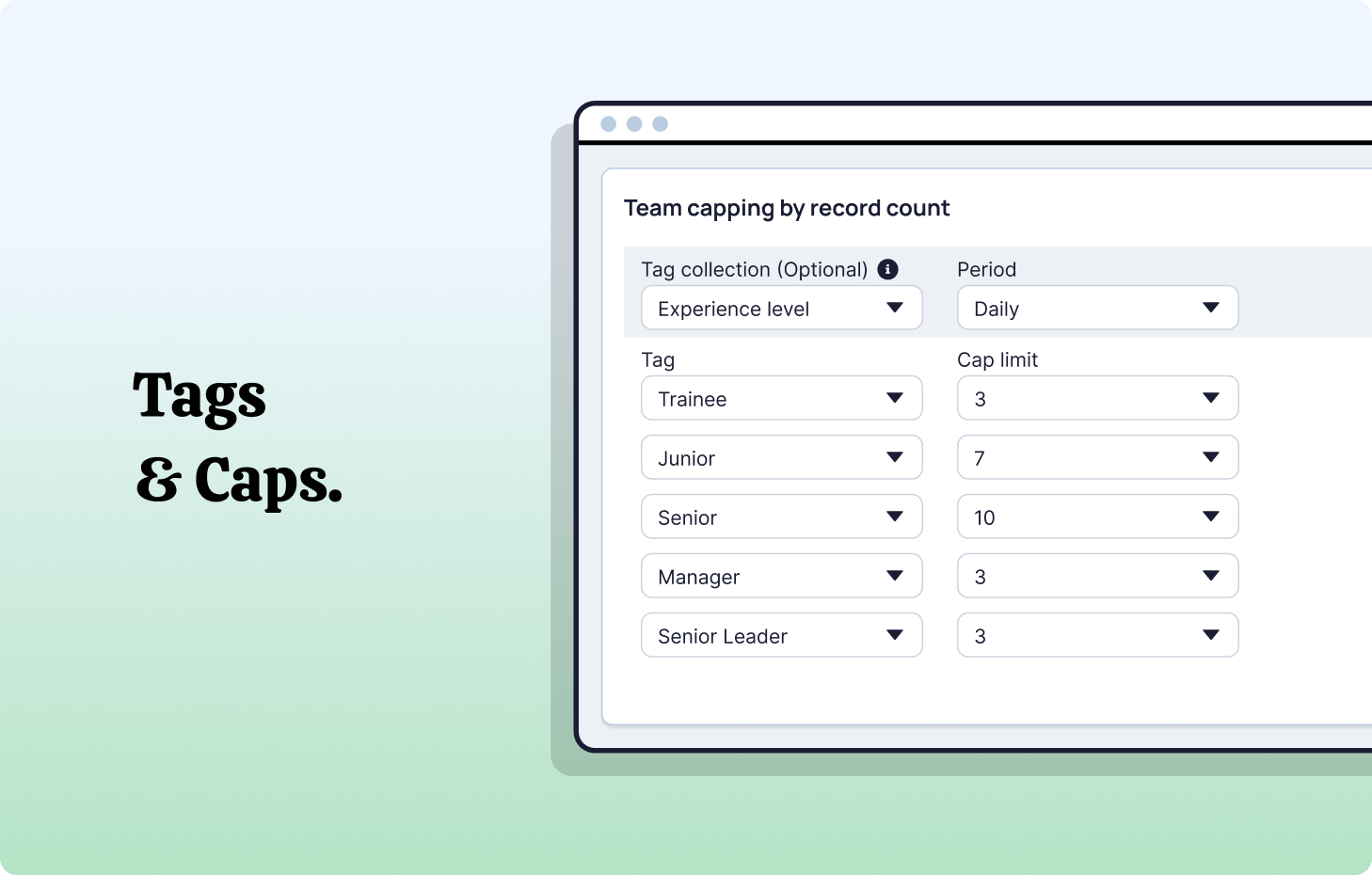
Capacity-aware distribution fixes this by flexing assignments dynamically based on active pipeline, resource availability, and current workload. This isn't just fairness theater - it prevents burnout and gives managers visibility they don't get from native CRM tools.
Scalability without headcount.
Manual booking scales linearly. As volume rises, admin time rises proportionally.
Native Salesforce tools struggle once rules multiply. Teams patch together calendars, forms, handoffs, and Flow automations. The admins in charge describe maintaining "exceptions on top of exceptions" - tech debt that compounds and slows everything down.
The real challenge: workflows that scale without requiring Apex code or constant custom maintenance.
The architectural gap nobody talks about.
Here's where most scheduling strategies fall apart: Salesforce holds your data. Salesforce Calendar holds availability. But routing, available time, skills, and capacity need to be evaluated together in real-time. Native Salesforce can't do this without heavy Apex + Flow + admin heroics.
Even when teams automate parts of the process, they still rely on manual review because they don't trust the patchwork of rules. That's the real architectural problem:
Appointment booking systems don't understand routing logic. Routing systems don't understand calendars.
This is the Calendly/Flow wall. Calendar systems book meetings with whoever happens to be available. Salesforce rules can route records - but not availability + capacity + skills + service territories in real time. You need both evaluated in a single pass, or you end up with the 15-20% meeting reassignment rate most teams experience.
Why scheduling & routing need to be one system.
Let me show you how unified routing + scheduling actually behaves:
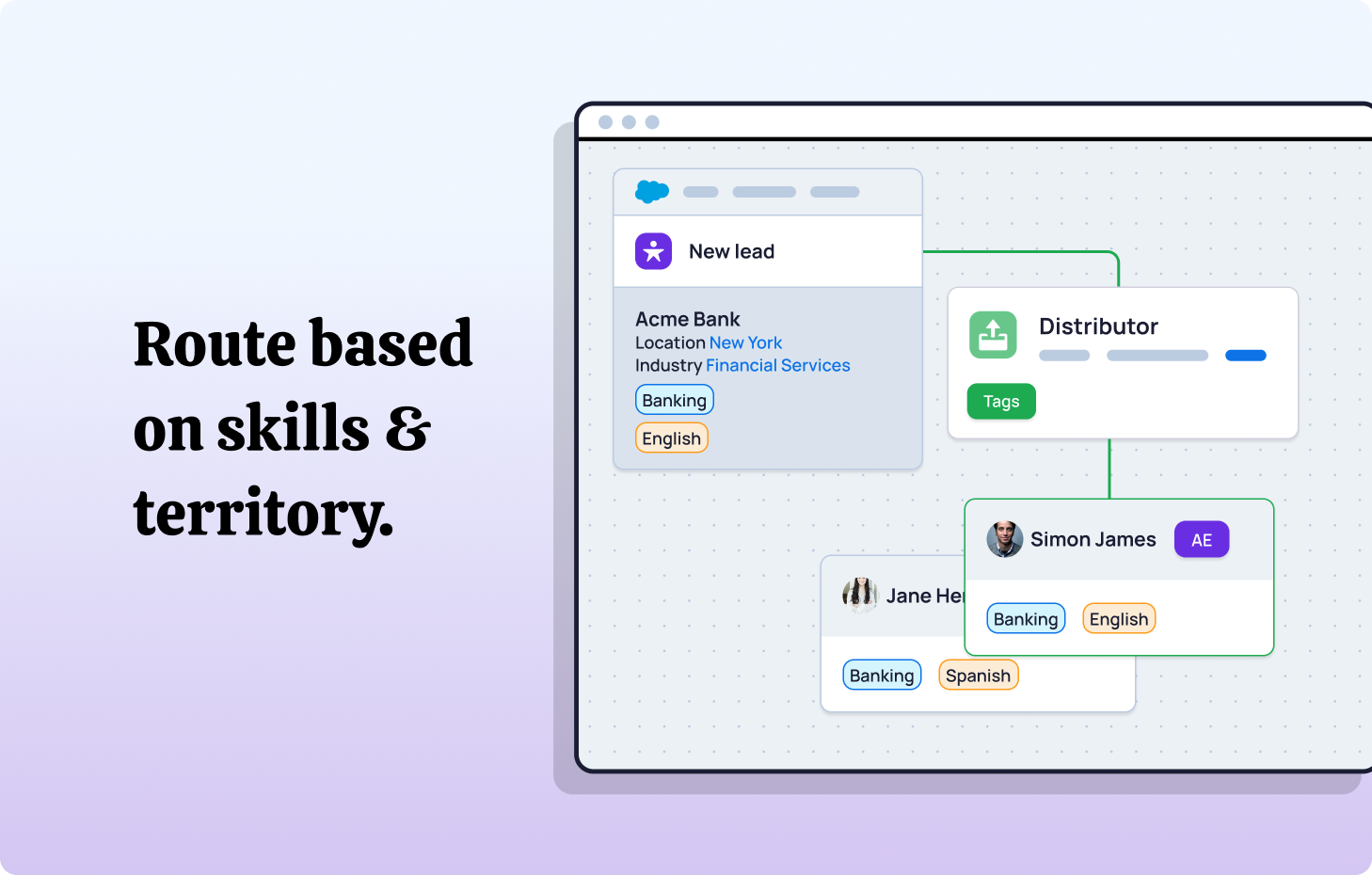
A prospect selects a time. Before any time slots are shown, the system evaluates:
- Service territory coverage
- Skills match (product/vertical expertise)
- Ownership rules
- Rep availability in their Salesforce Calendar
- Capacity tags (current load, pipeline, recency of assignment)
- Time zones for both customer and rep
Only eligible reps' time slots appear. The service appointment books with correct ownership, synced calendar, and CRM updates happen instantly - and if the rep is unavailable, the system can automatically reschedule with a resource who is.
This eliminates the reassignment cycle entirely. No manual review needed because the logic prevents wrong assignments from happening in the first place.
This also delivers what revenue ops teams actually need: predictable assignment that can be audited, adapted, and trusted without constant supervision.
How to implement automated scheduling without the chaos.
Here's a practical sequence that actually works:
1. Audit current state
Count manual assignments, reassignment rate, average time-to-schedule, and SLA breaches. You need baseline metrics or you can't measure improvement. Review your existing templates, workflows, and Flow screens to identify what's working and what's breaking.
2. Define routing and scheduling policies before touching tools
This is where most implementations fail. Teams configure technology before defining strategy. Decide what "right" looks like for assignment in your business - then configure systems to execute that strategy. Document your work types, service territories, and capacity rules clearly.
3. Pilot with high-volume appointment types
Start where automation delivers immediate ROI: demos, discovery calls, initial consultations, or field service appointments. Roll out to limited group, monitor metrics, refine logic, expand after validation. For teams with mobile app requirements or field technicians, include those resources in pilot testing.
4. Track the metrics that matter
- Speed-to-lead
- Time to first action
- SLA adherence
- Reassignment rate
- Active load per service resource
- Resource availability utilization
- Time zone booking errors
These indicators reveal whether automation is working or where it's breaking. Build dashboards that surface these in real time, not monthly reports.
5. Expand across the full customer journey
Because routing applies to leads, opportunities, accounts, cases, renewals - not just demos. The same logic that improves lead distribution improves case routing, account assignment, renewal handoffs, and field service dispatch.
API and Integration Considerations
For teams with existing tech stacks, API flexibility matters. Whether you're integrating with marketing automation, customer support platforms, or field service management tools, your scheduling system needs to expose the right data and accept updates from external systems without breaking assignment logic.
The best implementations leverage Salesforce's API capabilities to create seamless handoffs between systems while maintaining centralized routing intelligence. This prevents the "source of truth" fragmentation that kills data accuracy.
Troubleshooting Common Pitfalls
Even well-designed systems hit snags. The most common issues I see:
Time zone miscalculations: Prospect books in their local time, system assigns in rep's time zone, meeting lands at the wrong hour. Fix requires consistent time zone handling in both booking interface and CRM.
Reschedule loops: Customer needs to reschedule, system re-evaluates routing, assigns different rep, customer confused. Solution: maintain assignment ownership through reschedules unless capacity or territory rules explicitly prevent it.
Permissions conflicts: Rep can see appointment but can't edit it, or dispatcher loses visibility after handoff. Audit Salesforce permissions carefully and test with actual user profiles.
Notification overload: Every booking, reassignment, and reschedule triggers messages. Reps and dispatchers drown in noise. Tune notifications to signal exceptions, not every routine event.
Field service & Service Cloud use cases: beyond Sales
Here's what most teams miss: the same routing and scheduling intelligence that streamlines sales demos applies across the entire customer journey.
For Field Service operations, dispatchers face identical challenges - matching service resources to customer appointments based on skills, location, operating hours, and capacity. A technician in the field can't take five emergency calls simultaneously any more than a sales rep can run three demos at once.
Service Cloud teams managing case routing, renewal assignments, and support escalations need the same capacity-aware logic. The work types might differ, but the architectural requirements don't.
Smart organisations build unified scheduling policies that work across:
- Inbound sales inquiries
- Service appointments for field technicians
- Support case assignments
- Account management handoffs
- Renewal conversations
When your resource scheduling operates on consistent logic - whether it's a demo, a site visit, or a technical consultation - you eliminate the integration headaches and data inconsistencies that plague teams running separate systems for each use case.
The Capacity Awareness Piece Everyone Misses
Capacity-aware scheduling isn't a luxury feature. It's how teams maintain fairness and avoid burning out their best people.
What capacity-aware distribution looks like in practice:
- Weights and caps per rep (account for part-time schedules, training periods, ramp time)
- Active caps (maximum hot leads a rep can handle simultaneously)
- Load balancing methods that "catch up" under-assigned reps automatically
- Automatic reassignment if SLAs expire without action
- Notifications and messaging to keep reps and managers informed
This solves a problem I see constantly: managers manually reassigning work because workload visibility is fragmented across Slack, spreadsheets, calendars, and Salesforce. A scheduling tool alone can't fix that. You need routing intelligence built into the assignment logic.
The Bottom Line.
Manual scheduling slows teams down in ways most people never see: delayed follow-up, inconsistent handoffs, double-bookings, and confused ownership. The impact piles up across every part of the customer journey.
The deeper problem is structural. When scheduling lives outside Salesforce and routing logic lives inside it, teams spend their time stitching the two back together. Reps guess at availability, managers chase missing calendar updates, and high-intent leads wait longer than they should.
Teams that bring scheduling into Salesforce - with real-time availability, territory rules, account ownership, and clean CRM updates - see a sharp jump in responsiveness and fairness. Meeting booking becomes instant instead of a chore. Handoffs stop relying on Slack messages. Every invite is sent, every record stays clean, and every rep gets the right meeting at the right time.
With Booking Engine, this looks like:
- Instant booking through personal links or team handoffs, synced with Google or Microsoft calendars.
- Smart routing based on ownership, territory, or availability - the same logic that already powers Distribution Engine.
- Zero admin overhead, because every booking updates Salesforce automatically and keeps data clean for reporting.
In competitive markets, the first team to confirm a meeting often wins the deal. Automated scheduling isn’t a nice-to-have - it’s part of your revenue infrastructure.
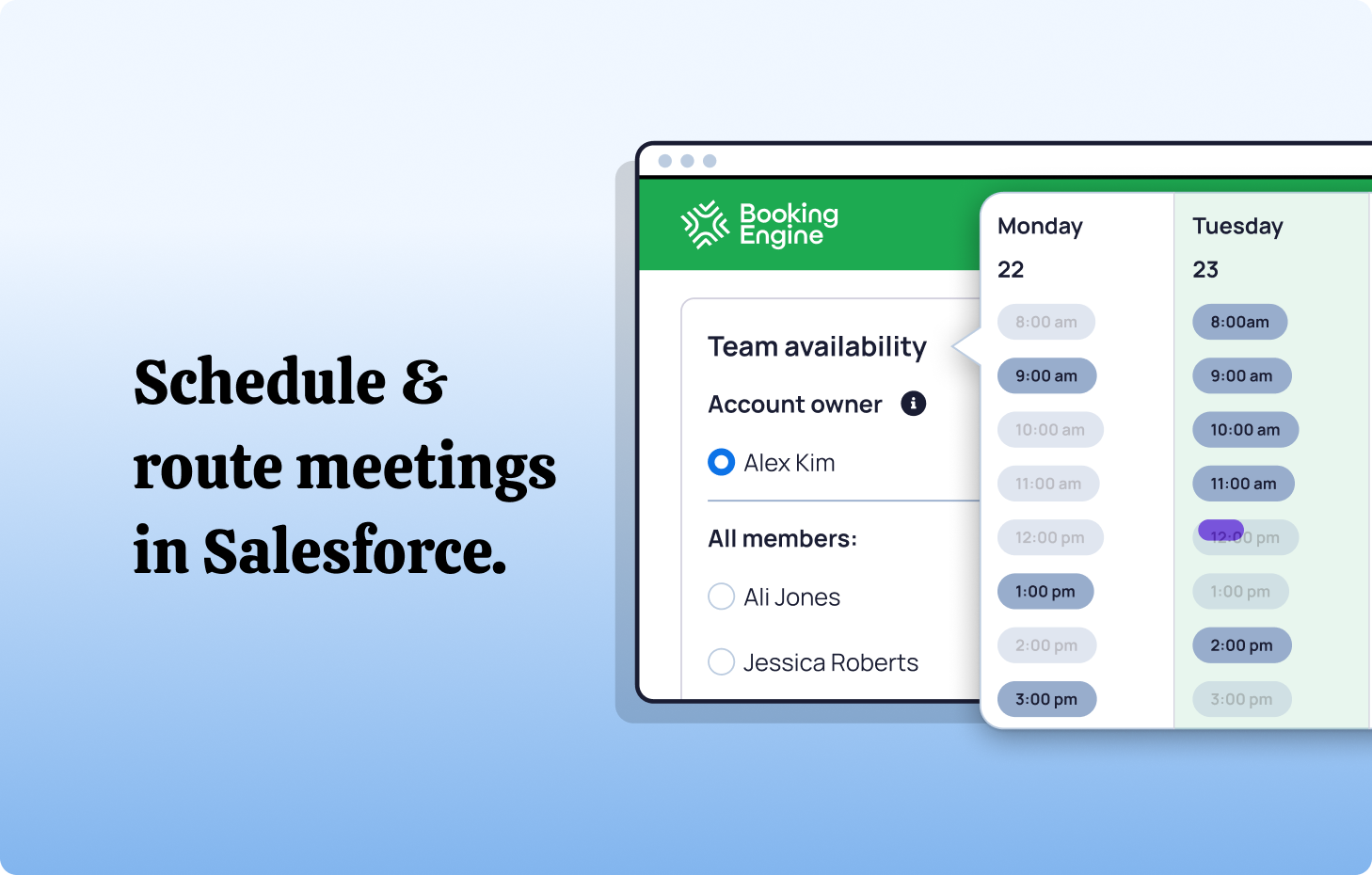
The teams winning fastest are the ones treating scheduling and routing as one workflow, not two separate jobs. When both happen natively in Salesforce - powered by clear rules, shared availability, and accurate data - speed becomes automatic. When they’re separate, the coordination tax only grows.
FAQs
1. What is Distribution Engine?
Distribution Engine is NC Squared's 100% native Salesforce routing solution-think of it as your intelligent traffic controller for leads, cases, opportunities, and any record that needs to land with the right person. It assigns based on skills, capacity, territory, tags, availability-whatever logic actually reflects how your team works. No custom code required, everything stays secure inside Salesforce, and the whole system scales as you grow. It's routing that finally keeps pace with reality.
2. What is Booking Engine?
Booking Engine is NC Squared's native meeting scheduler that removes the calendar ping-pong entirely. Prospects see your team's actual availability, filtered by territory, ownership rules, and capacity, then book directly-no email chains, no timezone confusion. It syncs automatically with Salesforce, so everything stays aligned. Basically, it closes the gap between "interested prospect" and "scheduled conversation" without the usual friction.
3. How does automated scheduling improve speed-to-lead?
Simple: it eliminates the delay. Manual scheduling means reps sending availability, prospects picking slots, someone forgetting to update Salesforce-meanwhile, the lead goes cold. Automated scheduling shows live availability filtered by territory and capacity, prospects book instantly, and the system logs everything in real time. At volume, that gap between intent and conversation becomes your competitive advantage.
4. What's the difference between scheduling and routing in Salesforce?
Routing answers "who owns this?" Scheduling answers "when does the meeting happen?" When those live in separate systems, you get mismatches, reassignments, and confusion about who's actually responsible. Unifying them inside Salesforce means fewer handoff errors, cleaner accountability, and workflows that don't require constant manual correction. Distribution Engine handles the orchestration so nothing falls through the cracks.
5. Why does capacity-aware distribution matter for sales and service teams?
Because static round-robin systems don't account for reality. They overload your best performers while underutilizing others, creating uneven workload and unpredictable response times. Capacity-aware distribution adjusts dynamically based on current workload, pipeline volume, availability, and SLA commitments. It's fairer for your team and more reliable for your customers-and it prevents the burnout that quietly tanks conversion rates.
Fancy giving Distribution Engine a try?
Have a play around for free, or get in touch if you’d prefer to chat.


Take us for a spin with a 30 day Free Trial
Have a play around for free, or get in touch if you’d prefer to chat.
%20dark.avif)