
Salesforce Ben's AppAssessor review of Distribution Engine - check it out now!
Test it for free for 30 days or get in touch if you’d prefer to chat.
Fancy giving Distribution Engine a try?
Have a play around for free, or get in touch if you’d prefer to chat.
Salesforce Appointment Scheduling: The Complete Guide for Revenue Teams
Key takeaways:
Scheduling is the last mile of speed-to-lead: You can route a hot lead in milliseconds, but if the prospect still has to play email tag to find a slot, you've handed all that speed straight back.
The booking moment is the conversion moment: Roughly 78% of buyers go with the vendor that responds first. A live, on-the-spot booking captures intent while it's hot - a "we'll send you some times" email lets it cool.
Salesforce appointment scheduling means the calendar lives in your CRM: No exported data, no third-party silo, no reconciliation job. The meeting, the routing logic, and the record all sit on the same platform.
Routing and scheduling are the same problem: A booking is only as good as the rep it lands on. Availability, territory, round-robin balance, and skills should decide who owns the meeting - not who happened to grab it.
Native Salesforce Scheduler has limits: It's built for field-service and patient-style appointments, not fast B2B sales handoffs. Many revenue teams outgrow it (or bolt on Calendly) and end up with data living outside Salesforce.
Self-service booking scales your pipeline without scaling headcount: Let qualified prospects book themselves onto the right calendar, instantly, and your reps spend their time in conversations rather than coordinating them.
A prospect fills in the demo form at 4:58pm. They're interested - genuinely, wallet-out interested. An SDR picks it up the next morning, qualifies it, and passes it on. Two days and four reply-all messages later, a slot is finally agreed. By then the prospect has cooled, booked a competitor, or simply moved on.
Nobody did anything wrong. The lead was routed. The follow-up happened. The system worked. And the deal still leaked out through the gap between "I'm interested" and "it's in the diary."
That gap is what Salesforce appointment scheduling is supposed to close. Done well, it turns the booking moment into part of the conversation - the meeting gets set while intent is still high, on the right rep's calendar, with everything logged in Salesforce. Done badly (or not at all), it's where your hard-won speed-to-lead goes to die.
This guide is for revenue teams - RevOps, sales ops, and the SDR/AE leaders who own pipeline. We'll cover what Salesforce appointment scheduling actually is, why it's a revenue problem rather than an admin one, the three ways teams typically solve it, and what a scheduling setup that respects your routing logic looks like in practice.
What is Salesforce appointment scheduling?
Salesforce appointment scheduling is the process of booking meetings - demos, discovery calls, consultations, renewals - directly against your Salesforce data, so that the meeting, the attendee, and the record all live on the same platform.
In plain terms: instead of a prospect emailing back and forth to find a time, or a rep manually checking calendars and creating an event, the booking happens through a defined workflow. The system knows who's available, who should take the meeting based on your rules, and writes the result straight back to the Lead, Contact, or Opportunity.
The important word is directly. Plenty of tools can put a meeting in a calendar. The thing that makes scheduling "Salesforce" scheduling is that there's no gap between the booking and the CRM - no nightly sync, no Zapier patch job, no manually copied notes. The data is native, which means your reporting, your routing, and your follow-up automation can all act on it the moment it happens.
Why appointment scheduling is a revenue problem, not an admin one.
It's tempting to file scheduling under "logistics" - something the ops team sorts out once and forgets. That framing is exactly why so much pipeline leaks here. Three reasons it's a revenue lever:
- Speed wins deals. The research on response time is brutal and consistent: contact a lead within five minutes and you're vastly more likely to qualify them than if you wait even half an hour. Around 78% of customers buy from the company that responds first. A scheduling step that adds a two-day delay quietly undoes every speed-to-lead investment you've made upstream.
- The handoff is where context dies. When an SDR books a meeting for an AE manually, detail leaks - the wrong time zone, a double-booking, a discovery note that never makes it across. A structured SDR-to-AE handoff keeps the context attached to the meeting, so the AE walks in informed rather than cold.
- No-shows are a tax on your funnel. Every meeting that's booked but not attended is wasted pipeline and wasted rep time. Automated reminders, easy self-service rescheduling, and instant re-routing of cancellations claw a meaningful chunk of that back.
In other words, the booking flow sits on the critical path of your revenue, not off to the side. Treat it like infrastructure, because it is.
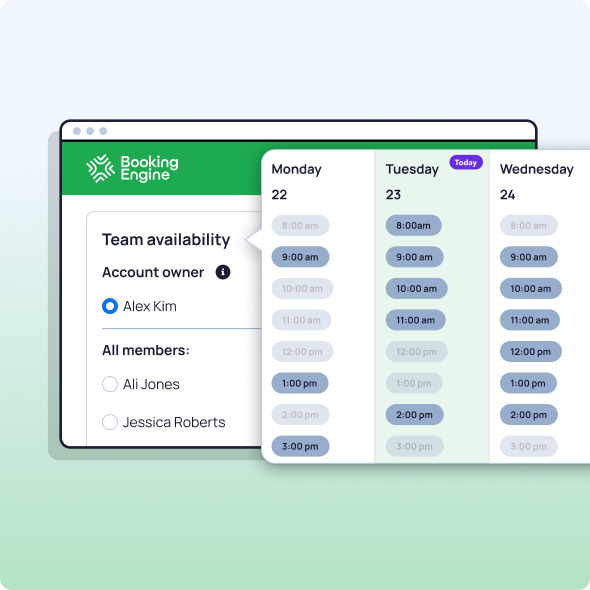
The three ways revenue teams schedule meetings in Salesforce.
Most teams end up in one of three camps. Each works - up to a point.
1. Native Salesforce Scheduler.
Salesforce Scheduler (formerly Lightning Scheduler) is the platform's built-in answer. It's genuinely capable, and because it's first-party, your data stays in Salesforce.
- The limit: It was designed primarily for field service, banking, and healthcare-style appointments - think "book a 30-minute branch consultation with a mortgage advisor." For fast-moving B2B sales handoffs it can feel heavy, and configuring it for round-robin sales routing or instant inbound booking usually means a certified admin and a fair bit of setup. Many revenue teams find it's more machinery than they need for "get this hot lead onto the right AE's calendar, now." If that's you, it's worth seeing how a sales-first booking tool compares to Salesforce Scheduler.
2. Third-party scheduling tools (Calendly, Chili Piper, and friends).
The pragmatic route: bolt a best-in-class scheduling tool onto Salesforce via an integration. These tools are slick, prospects know them, and they book meetings beautifully.
- The limit: The booking lives in their system first and arrives in Salesforce second - via a sync that can lag, break, or map fields imperfectly. You end up reconciling two sources of truth, your routing rules live in a different place to your CRM, and your data-residency and reporting get messier the more you scale. For teams who live in Salesforce, that external dependency is the thing that eventually hurts. (We've broken down the trade-offs against Calendly, Chili Piper, and SUMO Scheduler if you want the detail.)
3. Native-to-Salesforce booking apps.
The third option keeps the polish of a dedicated scheduling tool but builds it 100% inside Salesforce - so there's no external system to wrangle and no sync to babysit. NC Squared's Booking Engine sits in this camp: prospects book onto the right rep's real-time availability, the meeting writes straight to the record, and the same routing logic you use for leads decides who owns it.
- The advantage: One platform, one source of truth, and scheduling that's aware of your distribution rules rather than disconnected from them.
What great appointment scheduling looks like for revenue teams.
Whichever route you pick, the difference between a booking flow that leaks pipeline and one that compounds it comes down to a handful of capabilities. Here's the playbook.
Instant, self-service booking.
What improves: Qualified prospects book themselves onto a live calendar in seconds, capturing intent at its peak instead of waiting on a human to coordinate.
How it works: A booking link or embedded widget shows real availability and writes the confirmed meeting straight to Salesforce.
Measure: Time from inbound to booked meeting; % of meetings booked within the first hour of inbound.
Routing-aware assignment.
What improves: The meeting lands on the right rep - by territory, capacity, round-robin balance, or skills - not just whoever's link got clicked.
How it works: Scheduling shares the same lead routing logic as the rest of your funnel, so a booking respects ownership, working hours, and availability. Pair it with Distribution Engine and a meeting is just another record being routed fairly.
Measure: Meeting distribution variance across reps; % of meetings matched to the correct owner/territory.
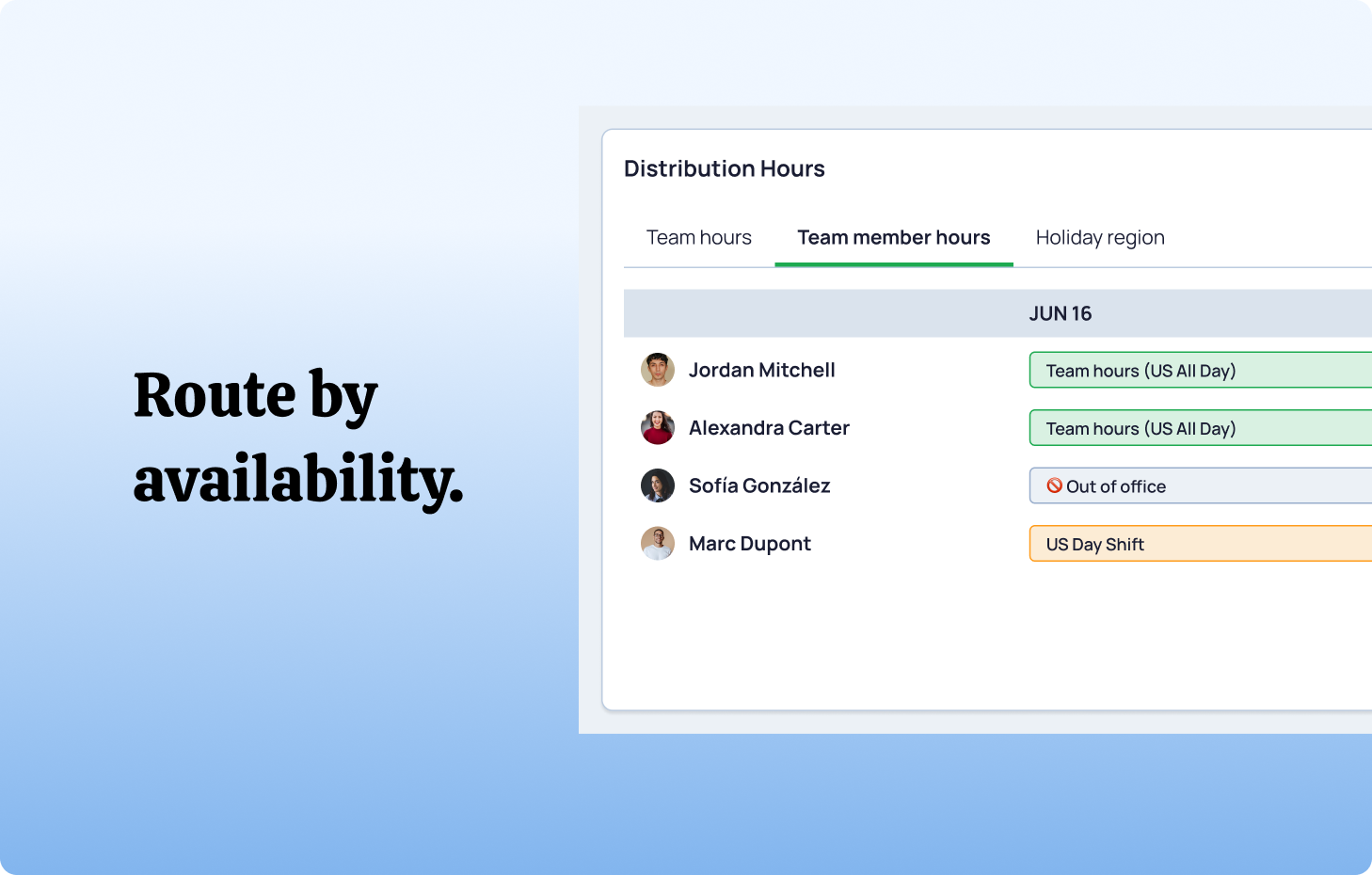
Slick SDR-to-AE handoff.
What improves: Outbound reps check team availability and book the next meeting on the spot, mid-conversation, with the context attached.
How it works: The SDR sees the AE's real calendar from inside Salesforce and books directly - no "I'll send some times," no double-booking, no lost notes.
Measure: Handoff-to-held-meeting rate; AE no-prep complaints (down is good).
No-show and reschedule handling.
What improves: Fewer dead slots. Reminders nudge attendance; one-click rescheduling keeps near-misses alive; cancellations free the slot and re-route automatically.
How it works: Automated reminders fire before the meeting, and a cancellation triggers re-assignment so the freed time doesn't just vanish.
Measure: No-show rate; reschedule-to-held rate; rep idle-slot rate.
Everything reportable in Salesforce.
What improves: Because every booking is a native record, your dashboards show booked-vs-held, source-to-meeting conversion, and rep load without exporting anything.
How it works: Meetings, outcomes, and routing decisions are logged on-platform and roll up alongside the rest of your pipeline KPIs.
Measure: Source-to-meeting conversion; booked-to-closed-won by channel.
Common appointment scheduling mistakes.
Even good teams trip over the same things:
- The two-day handoff. Routing the lead fast and then booking the meeting slow. The clock doesn't stop just because the lead's been assigned.
- Calendar that ignores availability. Booking a "hot" prospect onto a rep who's on PTO, in back-to-backs, or already over capacity. Availability-aware scheduling isn't a nice-to-have; it's the whole point.
- Two sources of truth. Letting bookings live in an external tool and hoping the Salesforce sync keeps up. When it drifts, your reporting and routing drift with it.
- No fallback owner. A booking that can't find an eligible rep should spill to a backup queue, not into a void. Always set a catch-all.
- Set-and-forget. Availability, team membership, and routing rules change constantly. Review them on a cadence or your "instant" booking quietly starts mis-firing.
Booking Engine: scheduling that lives in Salesforce.
For revenue teams who've outgrown email tag - and don't want their meeting data living in someone else's database - NC Squared's Booking Engine is appointment scheduling built natively for Salesforce.
- Self-service booking onto reps' real-time availability, written straight to the Salesforce record.
- Routing-aware meetings that use the same fair, fast distribution logic as your leads - so the meeting reaches the most qualified, available rep, every time.
- On-the-spot SDR-to-AE handoff, so outbound agents can check team availability and schedule the next meeting mid-call.
- 100% Salesforce-native, so there's no external system, no fragile sync, and no second source of truth to reconcile.
Combine it with Distribution Engine and you've closed the whole loop: the lead is routed fairly and fast, and the meeting it generates is booked the same way - all on one platform, all reportable, all without writing code.
Frequently asked questions.
What's the best appointment scheduler that connects directly to Salesforce?
The "best" depends on your use case. For field-service or consultation-style appointments, native Salesforce Scheduler is a strong first-party option. For fast B2B sales - inbound demos, SDR-to-AE handoffs, round-robin meeting distribution - a Salesforce-native sales scheduling app like Booking Engine keeps every booking on-platform with no integration to maintain. The deciding factor is usually whether you want your meeting data to live inside Salesforce or in a connected third-party tool.
Can you automate meeting booking directly within your CRM?
Yes. With a native booking tool, a qualified prospect can self-serve a slot on the right rep's live calendar and the confirmed meeting is written straight to the Lead, Contact, or Opportunity - no manual event creation, no copy-paste, no sync delay.
How do you integrate booking with lead routing?
The cleanest approach is to use the same routing engine for both. When scheduling shares your lead-distribution logic - territory, capacity, round-robin, availability - a booked meeting is routed to the correct owner automatically, exactly the way an inbound lead would be. That's the model NC Squared uses by pairing Booking Engine with Distribution Engine.
Is there an alternative to Salesforce Scheduler for sales teams?
There are several, ranging from third-party tools like Calendly and Chili Piper to Salesforce-native apps like Booking Engine. The trade-off is data residency: third-party tools book first and sync to Salesforce after, while native apps keep the booking inside Salesforce from the start.
The bottom line: book the meeting while the intent is hot.
Speed-to-lead doesn't end when the lead is assigned. It ends when there's a meeting in the diary on the right rep's calendar - and every hour of "let me send you some times" in between is pipeline quietly cooling off.
Get appointment scheduling right and it stops being a logistics afterthought and becomes part of your conversion engine: instant, fair, routing-aware, and fully reportable inside the platform your team already lives in.
You closed the deal in the conversation. Don't lose it in the calendar.
Fancy giving Booking Engine a try?
Have a play around for free, or get in touch if you'd prefer to chat.
Fancy giving Distribution Engine a try?
Have a play around for free, or get in touch if you’d prefer to chat.





Take us for a spin with a 30 day Free Trial
Have a play around for free, or get in touch if you’d prefer to chat.
%20dark.avif)