
Salesforce Ben's AppAssessor review of Distribution Engine - check it out now!
Test it for free for 30 days or get in touch if you’d prefer to chat.
Fancy giving Distribution Engine a try?
Have a play around for free, or get in touch if you’d prefer to chat.
The 2026 Guide to Salesforce Lead Routing: Building Systems That Scale
Key takeaways:
Lead routing isn’t just about speed anymore - it’s about precision, ensuring the right rep engages at the right moment.
Native routing breaks at scale - static rules create bottlenecks, burnout, and missed opportunities as volume grows.
Context is king - tag-based routing matches leads with reps who actually understand the prospect’s needs.
Capacity-aware distribution drives performance - balance workloads with caps and weighting to maximise team efficiency.
Protect pipeline integrity - account-based (sticky) routing ensures existing relationships aren’t disrupted.
Native-first systems win - keeping routing inside Salesforce eliminates data risk, sync delays, and scaling friction.
In the early days of a B2B SaaS company, Salesforce handles lead routing fine. Then lead volume picks up, territories change, and things start to slip. You spot it in the spreadsheets reps keep on their desktops to track what's really theirs. Or the Excel files getting emailed around as a workaround. Or the increasing frequency of "Hey, why did this right lead go to Sarah?" Slack messages.
Speed to lead still matters in 2026, but getting there first counts for less if the lead lands with the wrong rep. This guide covers how to move from manual lead routing rules that break every time something changes to automated lead distribution that actually keeps pace with your team.
What is lead routing in Salesforce?
Lead routing in Salesforce is the process of automatically assigning incoming leads to the right sales rep based on defined rules and logic. Out of the box, Salesforce provides Assignment Rules - condition-based criteria that match leads to reps or queues. For most teams starting out, this works fine. But as volume grows and sales teams become more specialised, the native toolset runs out of road. Modern lead routing in Salesforce goes further: routing by territory, rep availability, SLA thresholds, and skills - automatically, without code, and without taking lead data outside your CRM.
If you're new to lead routing, check out our video guide from Toms. He provides a great overview on what lead routing is and how automations can help you level up your lead routing in Salesforce.
Why Traditional Lead Routing in Salesforce Fails Under Pressure
Most companies start with Salesforce Native Assignment Rules. They work - until they don't. Because these rules are static and "top-down," they lack the functionality required for a modern sales floor.
The Three Breaking Points:
The "Dump" Problem: Native lead assignment rules don't care about capacity. They will happily bury your best rep under 15 incoming leads while a struggling rep sits idle, leading to burnout and missed SLAs. Without proper lead distribution software, response times suffer and sales leads go cold.
The "Developer Bottleneck": Changing a territory or adding a product specialist shouldn't require a Jira ticket or a deployment cycle. If your RevOps team can't change routing logic on the fly, your lead distribution system is too rigid for your business needs.
The "Data Leak": External routing tools that pull lead data out of Salesforce for processing introduce latency and security risks (GDPR/CCPA). In 2026, data residency is a non-negotiable for enterprise compliance - and it's a key reason many teams avoid integrations that push records outside their CRM.
How automated lead routing in Salesforce works
To build a system that scales to 10x your current volume, you must move beyond basic round-robin logic. Using Distribution Engine as a blueprint, here is the architecture of a high-performing lead routing software solution:Moving beyond Salesforce's native Assignment Rules means adopting a routing model built on four principles. Each addresses a specific failure mode of the native toolset - and together they form the architecture of a high-performing lead routing system that scales with your team:
Route by skills: matching leads to the right rep
Instead of routing by simple geographic location, use Tags. If an inbound lead comes in from a "FinTech" company looking for "Security API" integration, the system should look for reps tagged with those specific skills - ensuring the right rep handles every outreach.Rather than routing by queue position alone, skills-based routing matches the attributes of an incoming lead to the expertise profile of a rep. A FinTech prospect evaluating a Security API integration gets routed to the rep with FinTech experience and security product knowledge - not just whichever rep is next in the round-robin. Higher conversion rates result because the rep speaks the prospect's language from the first touchpoint.
To build a system that scales to 10x your current volume, you must move beyond basic round-robin logic. Using Distribution Engine as a blueprint, here is the architecture of a high-performing lead routing software solution:
Related reading: Lead Matching in Salesforce: Building the Foundation for Fair, Fast Routing.
Route by workload: capacity caps and weighting
A scalable lead distribution platform must respect Load Balancing. Tools like Distribution Engine allow you to set caps (e.g., no more than 10 active leads per rep) and weighting (e.g., your Senior AE gets 2x the leads of a Junior AE). This kind of real-time capacity awareness is what separates the best lead distribution software from basic routing rules.A scalable routing system must respect capacity. Distribution Engine allows you to set caps (e.g., no more than 10 active leads per rep) and weighting (e.g., your Senior AE receives 2x the leads of a Junior AE). This real-time capacity awareness is what prevents the "Dump" problem described above and separates automated routing from native Assignment Rules.
Learn more about setting up weightings and caps here, or check out our short video guide below:
Route by account: protecting existing relationships
One of the biggest friction points in Salesforce is "lead sniping" - when a new lead from an existing customer account goes to a random rep. Your routing engine should automatically perform lead-to-account matching, checking for Account Ownership or Active Opportunities to ensure the lead goes to the person who already holds the relationship. This account-based approach protects your pipeline and strengthens long-term trust.
Route by SLA: automatic re-assignment when time runs out
Speed-to-lead still matters. If a lead isn't "touched" (status changed or call logged) within 15 minutes, the system should automatically pull that lead back and re-assign it to an available rep. Notifications can alert team members in real time, and follow-up reminders ensure that no lead dies in a "black hole." This kind of automation is essential to streamline the entire sales process.Speed-to-lead still matters. If a lead isn't touched - status changed or call logged - within a defined window, the system should automatically pull it back and re-assign it to an available rep. Notifications alert team members in real time, and follow-up reminders ensure no lead dies in a dead end. This is the safety net that makes every other routing method more reliable.
The Implementation Roadmap
Building a world-class routing system is a journey, not a toggle switch. The right approach depends on your business needs, team size, and the maturity of your existing sales process.
Phase 1: The Foundation (Weeks 1–2)
Clean the Pipes: Audit your lead sources, tighten your web forms and lead capture setup, and deduplicate your data using tools like Cloudingo. Validation and enrichment at this stage save enormous headaches later.
Establish Baseline Logic: Implement basic round-robin and account-based matching. Layer in simple lead scoring so your sales team can prioritize high-intent prospects from the start.
Metric to Watch: Average time to first touch (response times).
Phase 2: Optimization (Months 1–3)
Layer in Skills: Start tagging salespeople by product expertise or language, connecting lead data to the right rep automatically.
Introduce Workload Balancing: Implement "Capping" so no one gets overwhelmed during a marketing automation campaign, product launch, or event-driven spike in new leads.
Integrate Your Stack: Where needed, explore add-ons for lead tracking, SMS notifications, or native integrations with your broader sales pipeline tools.
Metric to Watch: Lead-to-Meeting conversion rate.
Phase 3: The Strategic Edge (Quarterly)
Fairness Audits: Use Distribution Engine's distribution logs and dashboards to prove to the sales team that the "wealth" is being shared equitably. Transparent metrics build trust with sales agents across the floor.
Dynamic Availability: Sync routing with rep calendars and time zones to ensure leads aren't routed to someone who just hopped on a flight to Vegas. Optimize your system quarterly to reflect changes in team structure, territories, and key features your org has adopted.
How to route leads by territory in Salesforce
Territory-based routing assigns leads to reps based on defined geographic, industry, or segment boundaries. In Salesforce, this is typically handled through Assignment Rules mapped to fields like State, Country, Company Size, or Industry - but native rules have a critical weakness: they're static. The moment a territory changes, a rep moves regions, or you add a new vertical, someone has to manually update the rules. That's the developer bottleneck playing out in slow motion.
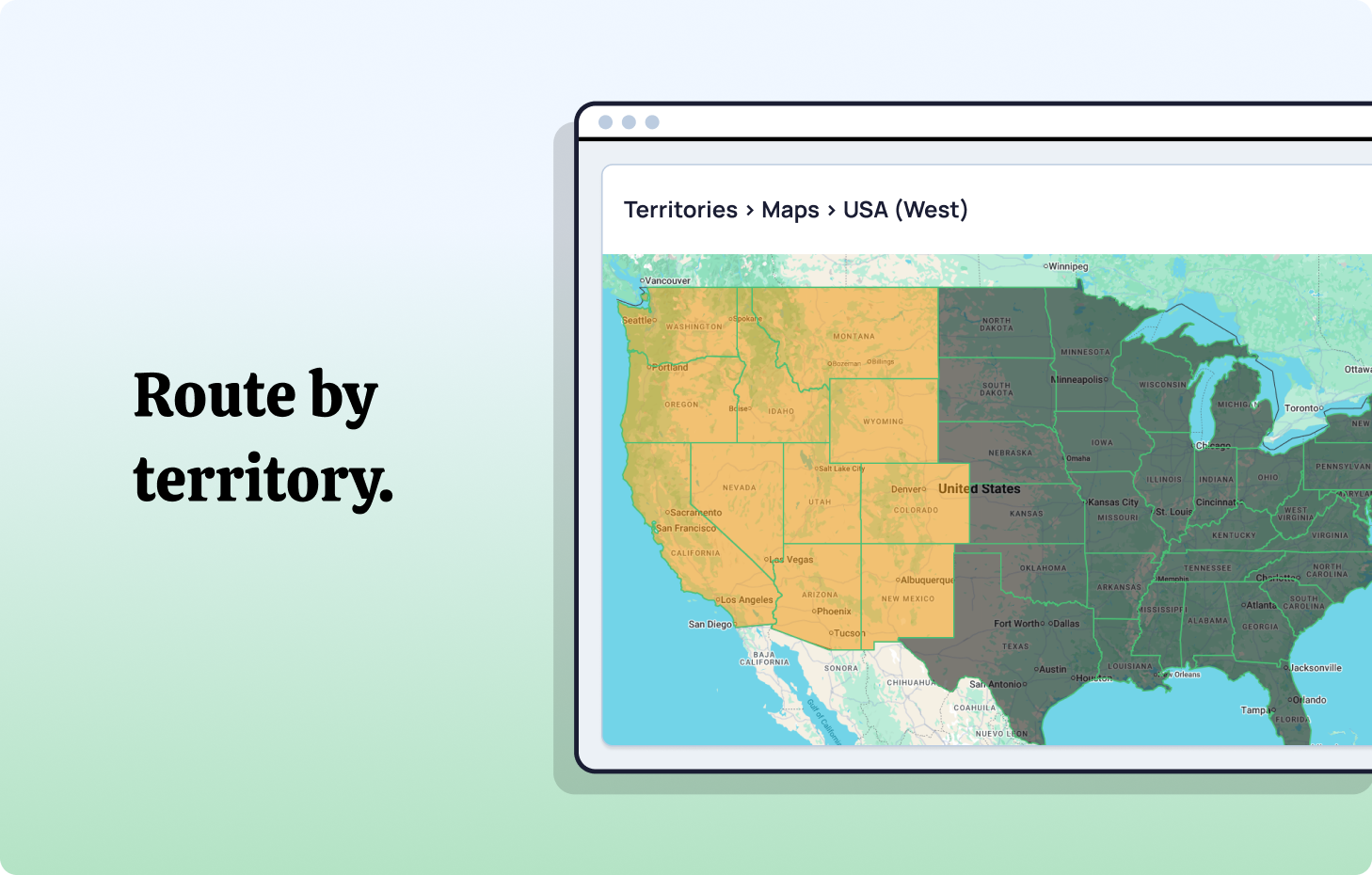
A modern territory routing model needs three capabilities native Salesforce lacks out of the box: the ability to define complex, overlapping territory logic without code; automatic fallback when no rep in a territory is available; and real-time adjustability without deployment cycles. Distribution Engine handles all three natively within Salesforce, letting RevOps configure territory logic through a point-and-click interface any admin can maintain. Territory changes that used to require a sprint can be made in minutes.
When to use it: Territory routing is best suited to teams with defined geographic or segment coverage models, where specific reps 'own' a region or vertical. If your team is structured around named accounts or segment boundaries, territory-based routing is the foundation everything else is built on top of.
Related reading: Territory Management in Salesforce: The Pipeline Architecture You're Probably Missing.
Routing leads based on rep availability
Routing a lead to the right rep means nothing if that rep is on a flight, blocked in back-to-back meetings, or working in a time zone where it's 11pm. Availability-aware routing is one of the most underrated aspects of lead routing in Salesforce - and one of the most common silent killers of speed-to-lead performance. The lead gets assigned correctly on paper, sits untouched for hours, and goes cold while your rep is none the wiser.
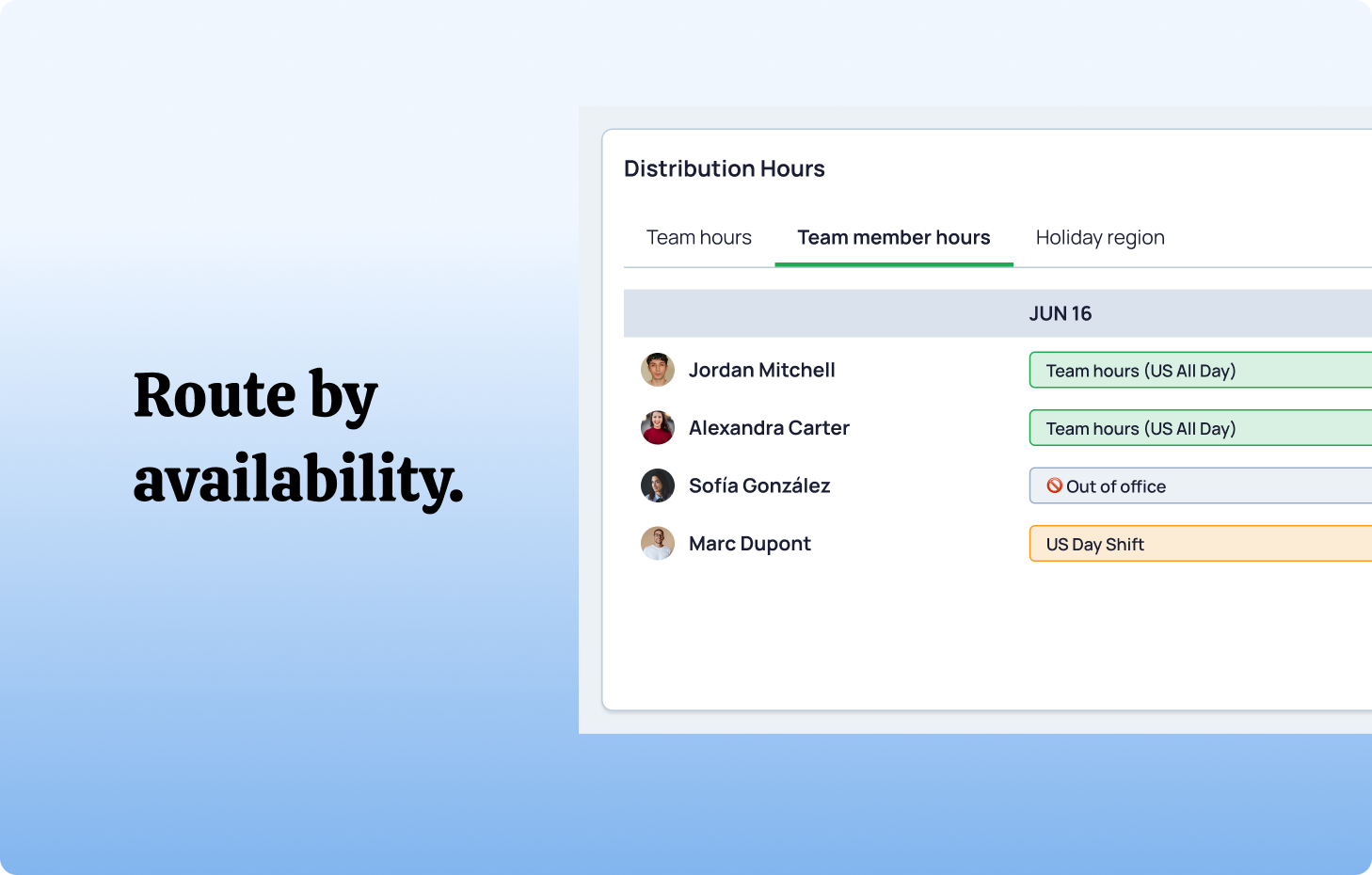
Availability routing works by syncing your routing logic with real-time rep status signals: working hours by time zone, calendar blocks, out-of-office flags, and manual availability toggles. When a matching rep is unavailable, the lead is held or re-routed to the next available qualified rep - rather than sitting in a queue until someone notices. For teams spanning multiple time zones or running follow-the-sun coverage models, this is the difference between a routing system that works 24 hours a day and one that only works 40% of the time.
When to use it: Any team with reps across multiple time zones, shift-based coverage, or strict speed-to-lead SLAs. If you're regularly seeing leads assigned but not touched for hours, availability-aware routing is almost certainly the fix.
Related reading: Route Leads by Availability: Mastering Team Hours in Salesforce.
SLA-based routing: ensuring every lead gets a response
SLA-based routing treats response time as a hard constraint, not a guideline. Rather than relying on reps to action leads promptly, the routing system enforces time-based rules automatically: if a lead hasn't been contacted within a defined window - typically five to fifteen minutes for high-intent inbound leads - it is automatically escalated, re-assigned to an available rep, or flagged for manager review. No lead falls through the cracks because the system doesn't wait for a human to notice.
.png)
There are typically two SLA tiers worth configuring. The first is a response SLA - the time from lead creation to first touch (a call logged, an email sent, a status change). The second is a follow-up SLA — the time between attempts for leads that didn't connect on first contact. Both need enforcement logic, not just reporting. Seeing SLA breach data in a dashboard after the fact is useful; preventing the breach in the first place is what moves the revenue needle.
When to use it: SLA routing is essential for any team handling inbound demo requests, trial sign-ups, or high-intent form fills - anywhere speed of first contact directly correlates with conversion likelihood. It's also the safety net that makes every other routing method more reliable: even if territory, availability, or skills logic routes a lead imperfectly, SLA enforcement ensures it still gets touched.
Related reading: SLA-Based Lead Routing: How to Automate and Boost Conversions.
Skills-based lead routing in Salesforce
Skills-based routing is the most sophisticated - and highest-impact - routing method available in lead routing in Salesforce. Rather than distributing leads purely by territory or queue position, skills-based routing matches the attributes of an incoming lead to the expertise profile of a rep. A FinTech prospect evaluating a security integration gets routed to the rep with FinTech experience and security product knowledge, not just whichever rep is next in the round-robin.
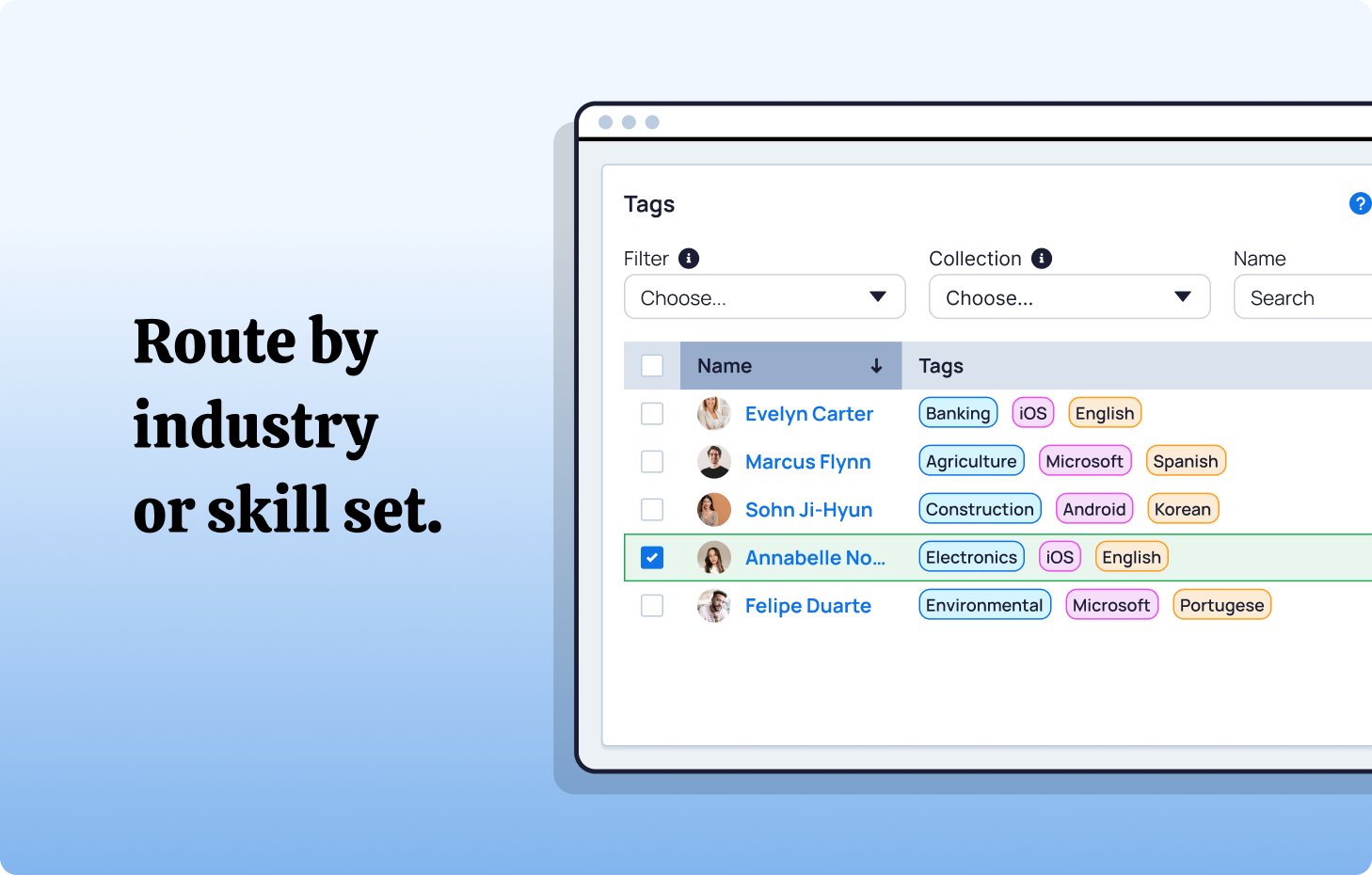
In Distribution Engine, this is implemented through Tags - a flexible labelling system applied to both leads and reps. A lead arriving with Industry: Healthcare and Product Interest: API Integration triggers a match against reps tagged with those same attributes. Common skill dimensions include: product line expertise, industry vertical knowledge, language capability, deal size experience, and partner or channel specialisation. Tags can be applied manually or populated automatically from enrichment data, CRM fields, or form responses.
The commercial case is straightforward. When the first touchpoint is with someone who genuinely understands the prospect's context, the conversation starts at a different level. Reps spend less time on qualification basics and more time on discovery. Conversion rates from first meeting to pipeline improve. And prospects who feel understood early are significantly more likely to progress through the buying cycle without stalling.
When to use it: Skills-based routing is most impactful for teams selling multi-product or multi-vertical portfolios, where a generic discovery call costs real conversion probability. It's also a strong lever for onboarding: routing new reps leads that match their prior industry experience means they can contribute to pipeline faster, even before they've mastered the full product suite.
How Distribution Engine can help you
If your current lead routing in Salesforce feels like a "black box" that only a developer can touch, you aren't just losing time - you're losing the trust of your sales team. In the 2026 landscape, the most resilient RevOps teams are moving their lead routing in Salesforce away from external middleware and rigid assignment rules in favour of Distribution Engine.
Bad routing means lost deals, wasted time, and strained teams. A good lead routing system flips the script: real-time speed, fairness, and measurable growth
By keeping 100% of your logic and data residency within Salesforce, Distribution Engine eliminates the sync lag and security risks that plague third-party integrators. It transforms routing from a manual chore into a high-speed revenue driver that respects rep capacity, rewards expertise, and ensures no lead ever hits a dead end.
.png)
That’s what NC Squared’s Distribution Engine delivers:
- Responsive: Reach buyers first with instant assignment and auto assign leads that aren’t contacted within their SLA
- Fair: You can’t argue with smart, rules-based routing logic. Keep workloads balanced and ditch the lead allocation spreadsheet!
- Accountable: Get real-time reports directly in Salesforce.
- Flexible: Self-serve on managing routing logic, sales territories, and rep availability without needing a Salesforce Admin or developer.
- Focused: We automate all the dedupe, matching and Salesforce admin so Sales can just focus on selling.
- 100% Salesforce-native: No new tools to log into and learn - all your data stays safe and secure in Salesforce.
The result: less firefighting, more revenue.
Ready to see it in action? Book a demo of NC Squared’s Distribution Engine and turn routing chaos into revenue clarity.
Fancy giving Distribution Engine a try?
Have a play around for free, or get in touch if you’d prefer to chat.



Take us for a spin with a 30 day Free Trial
Have a play around for free, or get in touch if you’d prefer to chat.
%20dark.avif)