
Salesforce Ben's AppAssessor review of Distribution Engine - check it out now!
Test it for free for 30 days or get in touch if you’d prefer to chat.
Fancy giving Distribution Engine a try?
Have a play around for free, or get in touch if you’d prefer to chat.
Salesforce Territory Management: Setup Guide and Best Practices.
Key takeaways:
Territories Are Revenue Architecture: Salesforce territory management isn't an admin exercise - it's the structural layer that determines whether your pipeline is balanced, predictable, and fair.
Enterprise Territory Management Is the Standard: Salesforce's Enterprise Territory Management replaces the legacy system with flexible models, hierarchies, and assignment rules - but it still requires an automation layer to work at scale.
Mapping Is Where Most Teams Stall: Territory mapping connects your go-to-market strategy to Salesforce data. Get it wrong and every downstream process - routing, forecasting, reporting - inherits the error.
Territory Routing Needs Automation: Territory-based lead routing outperforms simple assignment rules, but only when it's dynamic - accounting for availability, capacity, and skills in real time.
Distribution Engine Completes the Architecture: NC Squared's Distribution Engine automates what Salesforce Territory Management structures - routing leads, cases, and opportunities by territory in real time without custom code.
Most teams set up Salesforce Territory Management as an administrative checkbox rather than treating it as what it actually is: the foundational architecture of their revenue operations.
This guide walks through how to set up Salesforce Territory Management properly, the best practices that separate high-performing teams from everyone else, and where automation fills the gaps that native functionality leaves behind.
What is Territory Management in Salesforce?
Territory management in Salesforce is a framework for organising accounts, opportunities, and users into logical groupings based on criteria like geography, industry, product line, or customer segment. It controls who owns what, who can see what, and how records flow through your sales process.
At its core, it answers three questions:
Which rep should work this account? Territory rules define ownership based on attributes like region, company size, or vertical - removing ambiguity from the assignment process.
Who can see which data? Territory hierarchies control visibility, ensuring reps see the accounts relevant to them while managers get the broader view they need for coaching and forecasting.
How do we measure performance fairly? When territories are balanced and clearly defined, you can compare rep performance on a level playing field rather than attributing results to uneven territory allocation.
Salesforce offers this through its Enterprise Territory Management feature - the current standard that replaced the original Territory Management system (sometimes still referred to as Territory Management 1.0 or the "original" territory management).
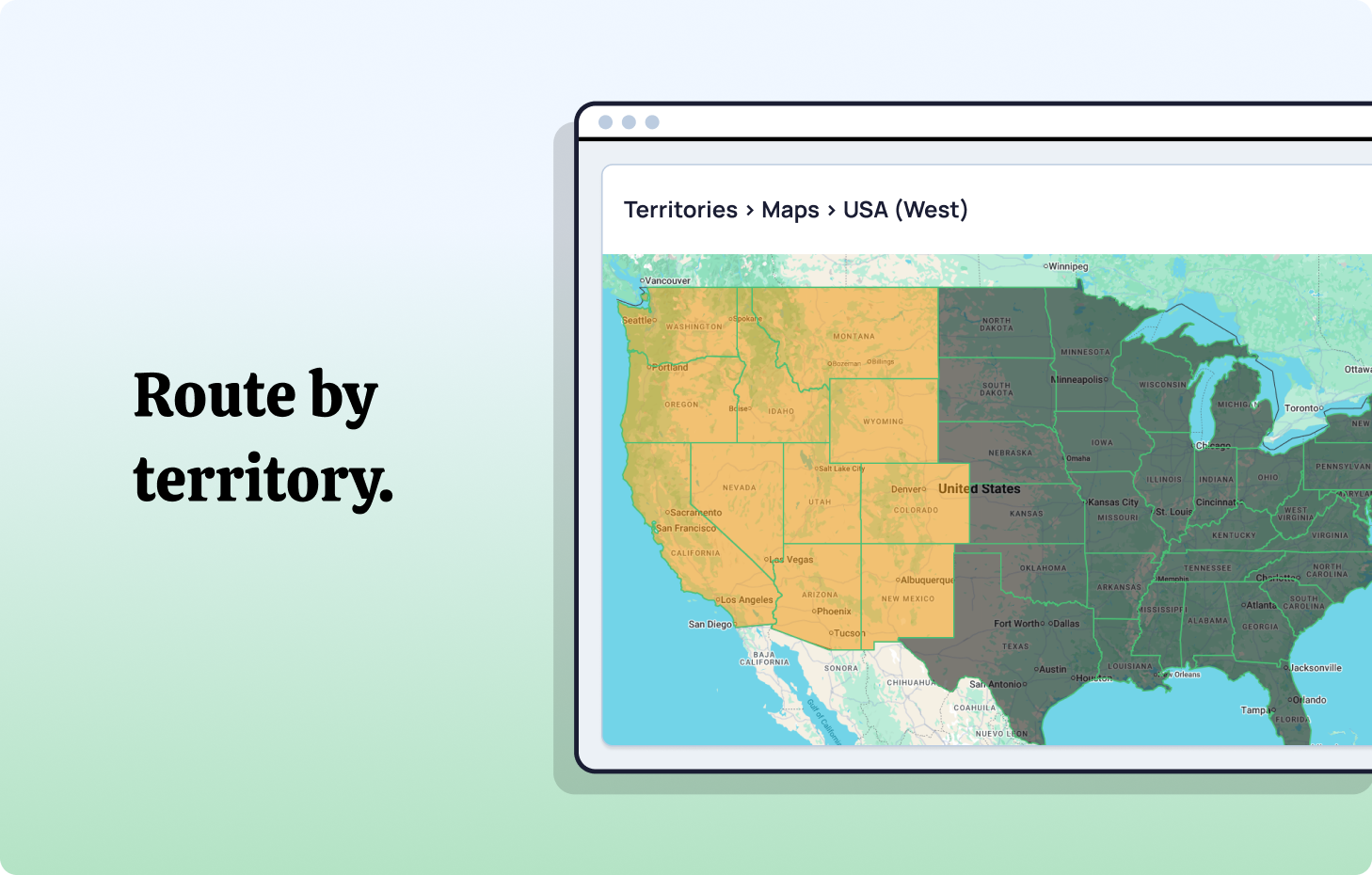
Enterprise Territory Management: What It Gives You.
Enterprise Territory Management is the active, supported version of sales territory management in Salesforce. It provides a more flexible and powerful framework than its predecessor, built around three core concepts:
Territory Models. A territory model is the container for your entire territory structure. You can build multiple models simultaneously - useful for testing new configurations before activating them. Only one model can be active at a time, but the ability to plan in parallel is valuable during reorganisations or fiscal year transitions.
Territory Types. Types categorise your territories by function - "Geographic," "Named Account," "Industry Vertical," or whatever taxonomy fits your business. They're organisational labels that help you manage complexity as your territory structure grows.
Territory Hierarchies. Hierarchies define the parent-child relationships between territories. A "North America" territory might contain "US West" and "US East" children, each of which contains state or metro-level territories. These hierarchies drive both data access and reporting roll-ups.
Enterprise Territory Management also introduces territory assignment rules - logic that automatically assigns accounts to territories based on field values. If BillingState = "California" AND Industry = "Technology", the account lands in your West Coast Tech territory.
The important distinction: Enterprise Territory Management structures your data and defines ownership. What it doesn't do - natively - is automate the operational layer: routing new leads into the right territory in real time, balancing workloads across reps within a territory, or handling reassignments when someone is unavailable.
That operational gap is where most territory implementations fall short.
How to Set Up Salesforce Territory Management.
Setting up territory management in Salesforce requires a methodical approach. Rush the configuration and you'll spend months untangling the consequences. Here's the process that works.
Step 1: Enable Enterprise Territory Management.
Navigate to Setup → Territory Settings and enable Enterprise Territory Management. Once enabled, this can't be disabled without Salesforce support intervention, so confirm your org is ready before flipping the switch.
Before enabling, ensure you have:
- A clear understanding of your current go-to-market segments
- Stakeholder alignment on territory definitions
- Clean account data (particularly the fields you'll use for territory assignment rules)
Step 2: Define Your Territory Model.
Create your first territory model in Setup → Territory Models. Start with a single model that reflects your current structure. You can build experimental models later, but your initial focus should be accurately representing how your team actually sells today.
Name it clearly - "FY2026 Territory Model" is better than "Test Model 1." You'll be managing this for the foreseeable future.
Step 3: Create Territory Types.
Before building individual territories, define your territory types. These are the categories that classify your territories:
- Geographic - segmented by region, state, or metro area
- Named Account - strategic accounts assigned regardless of geography
- Industry - vertical-specific territories
- Hybrid - combinations of the above
Keep types simple. Three to five types is typically sufficient. Over-categorisation creates complexity without adding value.
Step 4: Build Your Territory Hierarchy.
This is where your sales territory management strategy becomes structural. Build from the top down:
Top level: Global or national groupings Mid level: Regional groupings (EMEA, Americas, APAC - or whatever reflects your business) Bottom level: Individual territories that map to rep or team assignments
Each territory in the hierarchy inherits access rules from its parent, so design with data visibility in mind. A rep assigned to "UK - Financial Services" should see accounts in that territory, while their manager at "EMEA" should see everything beneath.
Step 5: Configure Territory Assignment Rules.
Assignment rules are the logic that connects accounts to territories. In Salesforce, these rules evaluate account field values against criteria you define:
- BillingCountry = "United Kingdom" AND Industry = "Financial Services" → UK Financial Services territory
- AnnualRevenue > 1000000 AND BillingState = "California" → Enterprise West Coast territory
Critical consideration: your assignment rules are only as good as your data. If BillingState is blank on 30% of your accounts, 30% of your accounts won't be assigned to a territory. Data hygiene is a prerequisite, not an afterthought.
This is where tools like Distribution Engine's Territory Classifier become valuable - normalising messy address data, inferring geography from partial information (like deriving state from area code), and ensuring records are stamped with clean territory values before assignment rules evaluate them.
Step 6: Assign Users to Territories.
With territories built and assignment rules configured, assign your users. Each rep should belong to the territory or territories where they sell. Managers should be assigned to parent territories to inherit visibility into child territories.
Step 7: Run Assignment Rules and Validate.
Execute your assignment rules against existing accounts and validate the results. Check for:
- Unassigned accounts (data quality issues)
- Accounts assigned to multiple territories (overlapping rules)
- Unbalanced distribution (one territory significantly larger than others)
Iterate on your rules until the output matches your expectations. Then activate your territory model.

Territory Mapping: Connecting Strategy to Salesforce.
Salesforce territory mapping is the process of translating your go-to-market strategy into Salesforce's territory framework. It's the bridge between "we want to segment by geography and company size" and "here's how that looks in the CRM."
Effective territory mapping requires three things:
Clear segmentation criteria. Decide what defines a territory before you build it. Geography is the most common dimension, but many teams layer in company size, industry vertical, or product line. The criteria should reflect how your team actually sells - not how your org chart looks on paper.
Accurate, complete data. Every field you use in territory assignment rules needs to be populated and standardised. "CA" and "California" and "Calif." in the same BillingState field will break your mapping. Clean your data before configuring territory rules.
Regular rebalancing. Markets change. Teams grow. Territories that were balanced in January can be wildly uneven by June. Build a quarterly review cadence into your territory planning process - not just for coverage, but for workload equity across reps.
Where most teams get stuck: territory mapping sounds straightforward on paper, but the reality is messy. Accounts have incomplete addresses. Industries are miscategorised. New leads arrive with minimal firmographic data. This is exactly why NC Squared built the Territory Classifier into Distribution Engine - it takes the guesswork out of territory assignment by normalising and enriching records before they enter your routing logic.
Territory-Based Lead Routing vs Simple Assignment Rules.
This is one of the most important architectural decisions in your Salesforce implementation, and it comes up frequently: should you route leads using territory-based logic or standard assignment rules?
Simple assignment rules evaluate leads sequentially against a list of criteria and assign the lead to the first matching rule's owner. They're easy to set up but limited in what they can do:
- No awareness of rep availability or capacity
- No workload balancing
- No territory-aware routing
- No fallback logic if the assigned rep is unavailable
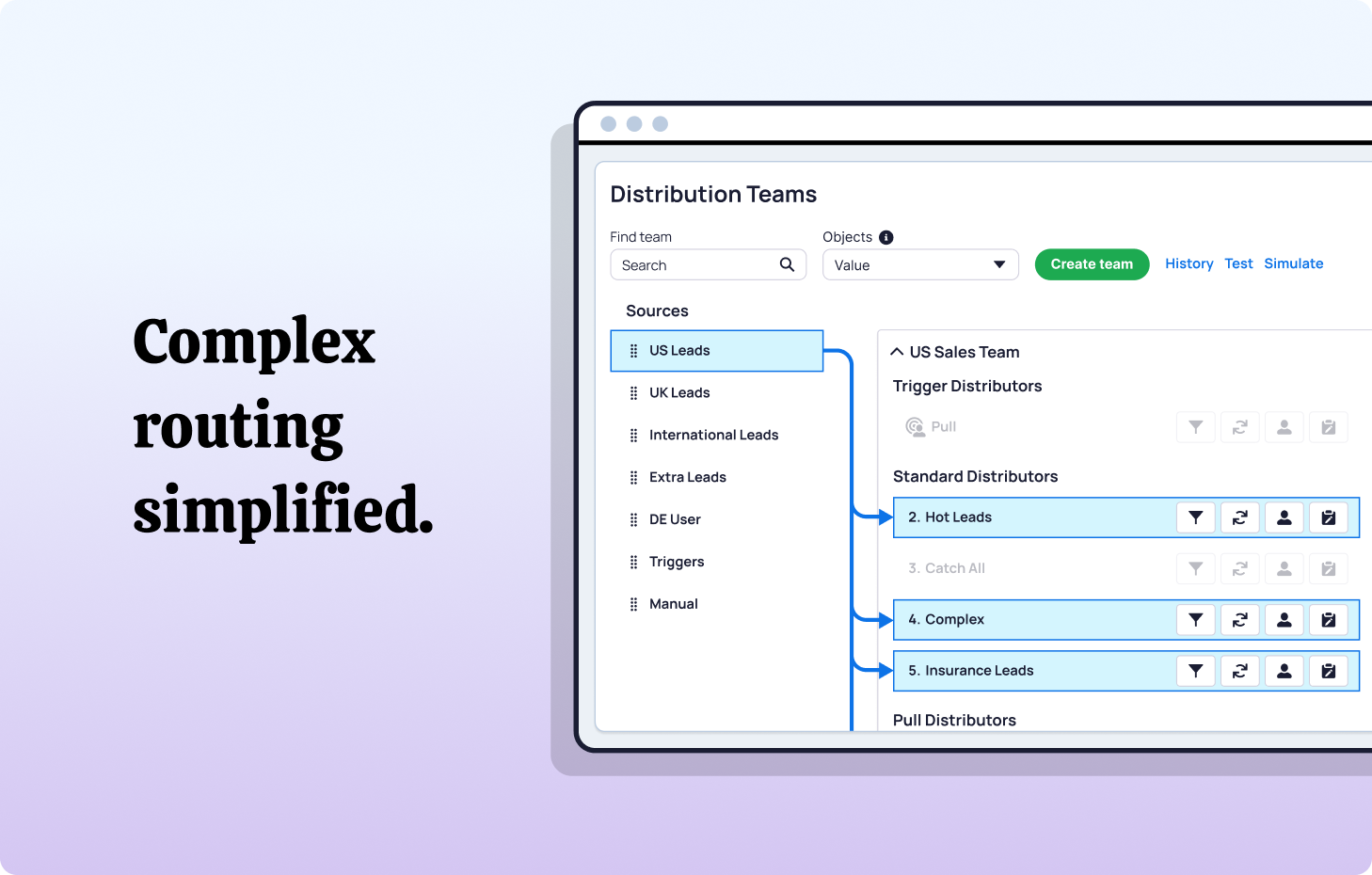
Territory-based lead routing adds a structural layer. Instead of assigning leads to individual reps, leads are first classified into territories based on their attributes (geography, company size, product interest). Within each territory, the lead is then routed to the appropriate rep based on additional logic - availability, workload, skills, or round-robin distribution.
The difference matters at scale. When your sales team is five people, a simple assignment rule works fine. When it's fifty - spread across time zones, specialisms, and capacity variations - you need the structure that territory-based routing provides.
The practical question teams ask: "How do I route leads by territory and still keep round robin?"
The answer is layered routing. The territory defines the pool of eligible reps. Round-robin (or weighted distribution, or capacity-based assignment) determines which rep within that pool receives the lead. Distribution Engine handles this natively - you define territory criteria, and the engine distributes leads within each territory using whatever algorithm fits your process.
Best Practices for Salesforce Territory Management.
Territory management best practices aren't about following a checklist - they're about building a system that survives contact with reality. Here's what high-performing RevOps teams do differently.
Design territories around outcomes, not org charts.m
It's tempting to mirror your organisational structure. Don't. Design territories around market potential, workload balance, and strategic priority. If your org chart and your territory structure align naturally, great. If they don't, the territory structure should win.
Keep the hierarchy shallow.
Every level in your territory hierarchy adds complexity to reporting, access control, and maintenance. Three levels is usually sufficient. Four is manageable. Five or more signals that you're over-engineering the structure.
Automate territory assignment for new records.
Manual territory assignment doesn't scale. As new leads, accounts, and opportunities enter Salesforce, they should be automatically classified and routed based on your territory rules.
Native Salesforce assignment rules handle basic account-to-territory mapping. For lead routing - where speed and accuracy directly impact conversion - you need automation that operates in real time, evaluating territory, availability, and workload simultaneously.
This is exactly what Distribution Engine does. It evaluates incoming records against your territory criteria, identifies the right territory, and routes to the best available rep within that territory - all automatically, all inside Salesforce.
Build for exceptions, not just rules.
Every territory model needs to handle edge cases: accounts that span multiple geographies, named accounts that override geographic rules, or leads with incomplete data that can't be cleanly classified. Build exception-handling logic into your territory design from day one rather than retrofitting it later.
Monitor territory balance continuously.
Balanced territories don't stay balanced. Track pipeline distribution, lead volume, and opportunity count per territory on a regular cadence. When imbalances emerge - and they will - adjust territory boundaries or rep assignments before the gap widens.
Separate territory ownership from account ownership.
A rep can be assigned to a territory without owning every account in it. This distinction matters for teams that use account-based strategies alongside territory-based routing. Design your access model to support both.
Territory Alignment and Planning.
Territory alignment is the process of ensuring your territory structure matches your current market reality. It's not a one-time exercise - it's an ongoing discipline.
Effective salesforce territory planning involves:
Market analysis. Understand where your total addressable market is concentrated. Which regions, industries, or segments have the highest density of potential customers?
Workload modelling. Calculate not just the number of accounts per territory, but the expected effort required. A territory with 50 enterprise accounts may demand more rep time than one with 200 SMB accounts.
Capacity assessment. How many reps do you have? What are their skill sets? Where are they located? Territory alignment should account for the humans who will actually work the territories.
Quota correlation. Territory balance and quota setting are deeply linked. If territories aren't balanced, quotas can't be fair. Alignment ensures every rep has a realistic path to attainment.
Teams like Tebra demonstrate what proper alignment looks like in practice - they consolidated Lead and Case routing into a single automated workflow, reducing lead response time by 40% and increasing conversions by 30% through territory-aware distribution.
Territory Forecasting.
Clean territory management transforms forecasting from guesswork into data you can actually trust.
When every account has a clear territory assignment, every opportunity has a clear owner, and every territory has consistent performance data, you can:
- Forecast by territory rather than just by rep, giving leadership visibility into geographic or segment-level trends
- Identify underperforming territories before pipeline gaps become revenue misses
- Model territory changes using inactive territory models to see how restructuring would affect pipeline distribution
- Compare territory performance on an apples-to-apples basis, since balanced territories remove structural bias from the data
Without clean territory architecture, your forecast is really just a collection of individual rep predictions - stitched together and hoped for the best.
Common Pitfalls in Territory Management.
Overlapping territory rules.
When territory assignment rules overlap, accounts can land in multiple territories - creating confusion about ownership and polluting your reporting. Audit your rules regularly for overlap and establish clear precedence logic.
Ignoring data quality.
Territory rules evaluate field values. If those values are missing, inconsistent, or incorrect, your territory assignments will be wrong. Invest in data hygiene before and during your territory management rollout.
This is one area where Distribution Engine's Territory Classifier provides significant value - automatically normalising address fields, inferring missing geographic data, and deduplicating records to ensure clean territory assignment.
Confusing territory management with role hierarchy.
Salesforce Territory Management and Role Hierarchy serve different purposes. Role Hierarchy controls data visibility based on a user's position in the organisational structure. Territory Management controls data access and ownership based on market segmentation. They complement each other but shouldn't be conflated.
A common question: "Should I use Salesforce Territory Management or Role Hierarchy?" The answer is typically both. Use Role Hierarchy for organisational access control. Use Territory Management for go-to-market segmentation and account ownership.
Static configuration in a dynamic environment.
Markets shift. Teams change. Products launch. If your territory model was built once and never revisited, it's almost certainly outdated. Build quarterly territory reviews into your RevOps calendar.
Manual routing within territories.
Setting up territories without automating the routing within them creates an architectural gap. You've structured the data beautifully, but leads still sit in queues waiting for manual assignment. The value of territory management is only realised when assignment happens automatically.
Choosing the Right Tools for Territory-Based Routing.
Salesforce provides the structural framework for territory management. The question is what provides the operational layer - the real-time routing, workload balancing, and availability-aware assignment that makes territories actually work.
This is the gap Distribution Engine was built to fill.
100% Salesforce-native. No external integrations, no data sync issues, no security risks. Everything runs inside your Salesforce org.
Territory-aware routing. Leads, cases, and opportunities are routed based on territory criteria combined with availability, capacity, and skills - not just static field matching.
Dynamic workload balancing. Within each territory, Distribution Engine distributes work fairly using round-robin, weighted, or capacity-based algorithms.
Real-time availability. Reps who are offline, at capacity, or on leave are automatically excluded from distribution - no manual queue management required.
Territory Classifier. Messy address data, incomplete fields, and ambiguous geographic information are normalised and enriched before records enter your territory routing logic.
Teams like Aetna reclaimed eight hours daily of manual Case assignment by routing through territory, product type, and agent availability with Distribution Engine. Shutterstock manages multi-language, skill-based routing across 20 countries - saving 60 hours weekly in manual routing.
That's what happens when territory structure meets operational automation.
From Territory Framework to Revenue Engine with NC Squared.
Salesforce Territory Management gives you the framework. But frameworks don't route leads. They don't balance workloads. They don't adapt to rep availability or reassign when SLAs are breached.
Distribution Engine turns your territory model into a living system.
- Incoming records are classified, enriched, and routed to the right territory automatically
- Within each territory, leads are distributed based on real-time availability and capacity
- SLA timers, alerts, and reassignments keep every lead moving
- Territory-level dashboards give managers the visibility they need to coach, forecast, and optimise
Across 20,000+ users, teams running Distribution Engine see lead response times collapse from hours to minutes, routing accuracy above 95%, and conversion uplifts of 30–40%.
If your territory model is set up but your routing is still manual, you've built the foundation without the engine.
See how Distribution Engine automates territory-based routing - directly inside Salesforce.
Fancy giving Distribution Engine a try?
Have a play around for free, or get in touch if you’d prefer to chat.



Take us for a spin with a 30 day Free Trial
Have a play around for free, or get in touch if you’d prefer to chat.
%20dark.avif)